
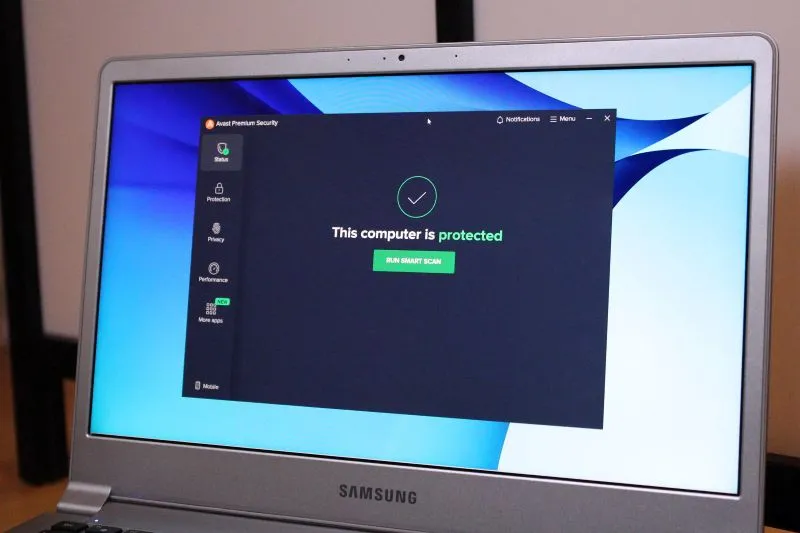
In today's cyberspace, people are doing more online. There streaming, downloading movies or short videos or music and that's why cybersecurity is more crucial than ever. With the rise of malware, viruses, and other online threats, it's essential to have a reliable antivirus solution to protect your Windows device. Among the numerous antivirus software available, Malwarebytes stands out as a top contender. In this article, we'll delve into the world of antivirus software, exploring the features, benefits, and drawbacks of various options, with a focus on Malwarebytes as a leading solution.
The Importance of Antivirus Software
Antivirus software is designed to detect, prevent, and remove malicious software, including viruses, Trojans, spyware, adware, and ransomware. These threats can compromise your personal data, slow down your device, and even lead to financial losses. With the increasing sophistication of cyber threats, it's vital to have a robust antivirus solution that can keep pace with the evolving landscape.
Malwarebytes: A Leading Antivirus Solution
Malwarebytes is a popular antivirus software that has gained a reputation for its effectiveness in detecting and removing malware. Founded in 2008, the company has developed a range of products, including Malwarebytes Premium, Malwarebytes Free, and Malwarebytes for Business. Malwarebytes' flagship product, Malwarebytes Premium, offers advanced features such as:
- Real-time protection: Malwarebytes Premium provides continuous monitoring of your device, detecting and blocking malware in real-time.
- Threat scanning: The software conducts in-depth scans of your device, identifying and removing existing malware.
- Ransomware protection: Malwarebytes Premium includes a dedicated ransomware protection module, which detects and blocks ransomware attacks.
- Anti-exploit technology: This feature protects against exploit-based attacks, which target vulnerabilities in software and operating systems.
Key Features of Malwarebytes
Malwarebytes offers a range of features that set it apart from other antivirus software. Some of the key features include:
- Lightweight and fast: Malwarebytes is designed to be lightweight and fast, ensuring that it doesn't slow down your device.
- Easy to use: The software features an intuitive interface, making it easy to navigate and use, even for those without extensive technical expertise.
- Regular updates: Malwarebytes receives regular updates, ensuring that it stays up-to-date with the latest threats and vulnerabilities.
- Multi-language support: The software supports multiple languages, making it accessible to users worldwide.
Comparison with Other Antivirus Software
While Malwarebytes is an excellent choice, it's essential to consider other antivirus software options. Some popular alternatives include:
- Norton Antivirus: Known for its comprehensive features and robust protection, Norton Antivirus is a top contender in the antivirus market.
- Kaspersky Antivirus: Kaspersky offers a range of antivirus products, including Kaspersky Total Security, which provides advanced features such as password management and online banking protection.
- Avast Antivirus: Avast is a popular antivirus software that offers a range of features, including real-time protection, threat scanning, and password management.
Pros and Cons of Malwarebytes
Like any software, Malwarebytes has its pros and cons. Some of the advantages include:
- Effective malware detection: Malwarebytes is renowned for its ability to detect and remove malware, including stubborn threats that other antivirus software may miss.
- Easy to use: The software is user-friendly, making it accessible to users of all skill levels.
- Regular updates: Malwarebytes receives regular updates, ensuring that it stays current with the latest threats and vulnerabilities.
However, some of the drawbacks include:
- Limited features in the free version: The free version of Malwarebytes lacks some of the advanced features available in the premium version.
- No built-in firewall: Malwarebytes does not include a built-in firewall, which may be a concern for some users.
- May not be compatible with other antivirus software: Malwarebytes may not be compatible with other antivirus software, which could lead to conflicts and reduced performance.
Conclusion
In conclusion, Malwarebytes is an excellent choice for Windows users looking for a reliable antivirus solution. Its advanced features, such as real-time protection, threat scanning, and ransomware protection, make it an effective tool against malware and other online threats. While it may have some limitations, such as limited features in the free version and no built-in firewall, Malwarebytes is a top contender in the antivirus market. By considering the pros and cons of Malwarebytes and comparing it with other antivirus software, users can make an informed decision about the best antivirus solution for their needs.
Recommendation
Based on our review, we recommend Malwarebytes Premium as a top choice for Windows users. Its advanced features, ease of use, and regular updates make it an excellent option for those seeking robust antivirus protection. However, users should also consider other antivirus software, such as Norton Antivirus, Kaspersky Antivirus, and Avast Antivirus, to determine which solution best meets their specific needs.
Final Thoughts
In today's digital landscape, cybersecurity is a top priority. With the rise of malware, viruses, and other online threats, it's essential to have a reliable antivirus solution to protect your Windows device. Malwarebytes is a leading antivirus software that offers advanced features, ease of use, and regular updates, making it an excellent choice for Windows users. By choosing the right antivirus software, users can enjoy a safer, more secure online experience, and protect their personal data from the ever-evolving threats of the digital world.

Shawn DesRochers is a certified Microsoft technician and Programmer with 30+ year's experience. He has written many reviews on computer related products, software, and SEO related topics. When he's not writing reviews he can be found at one of the Oldest Directories Online Blogging Fusion Business Directory which he is the CEO of.
Related Posts
Why Modular Laptops Are the Next Big Thing for Remote Professionals
Modular laptops let you upgrade CPUs, GPUs, and storage without replacing the whole machine, offerin... Read More

Modular Laptops: Building a Future‑Proof, Sustainable Workstation
Modular laptops let you swap compute, battery, and I/O components, offering a sustainable, cost‑ef... Read More
Windows 11 Home vs. Pro – Choosing the Right Operating System for Your Infrastructure
In the evolving landscape of modern computing, the operating system serves as the foundational archi... Read More
Top Posts

Zero‑Party Data: The Quiet Superpower Transforming B2B SaaS Marketing
Zero‑party data lets customers voluntarily share preferences, turning marketing from guesswork into a trusted, two‑way conversation that boosts conversions ...Read More

Generation Alpha Lingo: Decoding the Digital Dialect of the Digitally Native
Ah, Generation Alpha. The newest frontier in human development, the cohort born roughly between 2010 and 2024. These are the babies who’ve never known a world...Read More
Gemini’s Multimodal Engine: A New Playbook for SaaS Collaboration
Gemini’s ability to understand text, images, and code in a single conversation turns it into a collaborative partner for SaaS teams, speeding up feature deliv...Read More

ChatGPT as Your Everyday Creative Partner
Explore how ChatGPT transforms daily work—from idea generation and code snippets to mindful planning—while staying ethical and privacy‑smart....Read More
0 Comments
Post Comment
You will need to Login or Register to comment on this post!