
From Code to Canvas: Making On‑Page SEO an Experience, Not a Checklist
When I first stepped into the world of SaaS marketing, the on‑page SEO conversations felt like a never‑ending to‑do list: meta tags, header hierarchy, keyword density. It was efficient, sure, but it also felt mechanical—like we were treating search engines as the only audience. Over the past few years, I’ve watched the algorithmic landscape mature, and I’ve learned that the most sustainable rankings come not from ticking boxes, but from treating every page as a live, user‑centric canvas. This post is my attempt to reframe on‑page SEO as an experience design challenge, blending technical rigor with the empathy we normally reserve for product design.
The Problem with “SEO‑First” Thinking
Traditional “SEO‑first” mindsets often start with a keyword research spreadsheet, then rush to jam those terms into headings and body copy. The result? Pages that rank, but bounce. The bounce, in turn, sends negative signals back to the search engine, creating a feedback loop that erodes the very rankings you fought to achieve.
What’s missing is the human context. Google’s recent emphasis on the Search Generative Experience (SGE) shows that the engine is getting better at interpreting intent, not just matching strings. If we want to stay ahead, we need to shift from “optimizing for bots” to “optimizing for moments” — the precise point when a visitor lands, scans, and decides to stay.
Three Pillars of Experience‑Centric On‑Page SEO
Below are the three pillars I rely on when I audit a page for a SaaS product. Think of them as a triangle: each side supports the other, and the structure collapses if any side is weak.
- Intent Alignment – Does the page answer the exact question a user is asking?
- Interaction Flow – Is the visual hierarchy and UI guiding the visitor naturally toward the answer?
- Technical Trustworthiness – Are the behind‑the‑scenes signals (speed, structured data, security) reinforcing the experience?
1. Intent Alignment: Mapping User Journeys Directly Into Content
Instead of starting with keywords, I start with user intent scenarios. I ask: “If I were a product manager looking for a solution to improve my team’s onboarding, what would I need on this page?” The answer usually breaks down into three layers:
- Quick value proposition (the “what’s in it for me?” statement).
- Concrete proof points (case studies, data, or screenshots).
- Clear next steps (CTA, demo request, or downloadable asset).
When these layers are present, the page automatically satisfies the “informational,” “navigational,” and “transactional” intents that Google’s AI tries to infer.
To keep the mapping disciplined, I use a lightweight structured idea vault. It’s a place where I capture each intent hypothesis, the supporting evidence, and the visual or UI component that will deliver it. This habit turns vague brainstorming into a repeatable, data‑driven workflow.
2. Interaction Flow: Designing the Page Like a Product Feature
Once the intent map is solid, the next step is to treat the page as a feature of your SaaS product. That means applying the same UX principles you use for dashboards: hierarchy, whitespace, progressive disclosure, and micro‑interactions.
Header hierarchy becomes a visual roadmap. H1 should capture the core promise; H2s break down the promise into digestible benefits; H3s (or list items) provide supporting details. This hierarchy isn’t just for crawlers; it tells a human reader, “Here’s the story we’re telling you.”
Consider the above‑the‑fold zone as the “hero component” of a product screen. A concise headline, a short sub‑headline, and a primary CTA must be visible without scrolling. Below that, use interactive elements—accordions for FAQs, hover‑reveal snippets for case study results, or short auto‑playing videos (muted, with a clear play button) to keep the user engaged.
One trick I love is the “scroll‑triggered highlight.” As a visitor scrolls past a benefit statement, a subtle background shade animates to draw focus. This micro‑interaction signals to the search engine that the page is engaging (via dwell time and reduced bounce), while also guiding the visitor’s eye.
Finally, accessibility isn’t optional. Proper ARIA labels, descriptive alt text, and logical tab order improve the experience for assistive tech users and contribute to Google’s assessment of “page quality.”
3. Technical Trustworthiness: The Quiet Backbone
Even the most beautifully designed page will fall flat if it loads slowly or raises security flags. Here’s my quick technical checklist, refined from years of SaaS site audits:
- Core Web Vitals – Aim for LCP under 2.5 seconds, FID under 100 ms, CLS under 0.1. Use lazy loading for images and defer non‑critical JS.
- Schema & Structured Data – Go beyond basic Article schema. For SaaS, consider
SoftwareApplication,FAQPage, andReviewmarkup to surface rich snippets. - HTTPS & CSP – A secure connection is a baseline expectation. Implement a Content Security Policy to protect against injection attacks.
- International Targeting – If you serve a global audience, use
hreflangtags correctly to avoid duplicate content penalties.
If you need a deeper dive into trust‑focused optimization, the Zero‑Trust WordPress Security Playbook walks through hardening steps that dovetail nicely with on‑page performance goals.
Bridging the Gap: How Data Informs the Experience
All three pillars thrive on data. Here’s how I blend analytics with creative iteration:
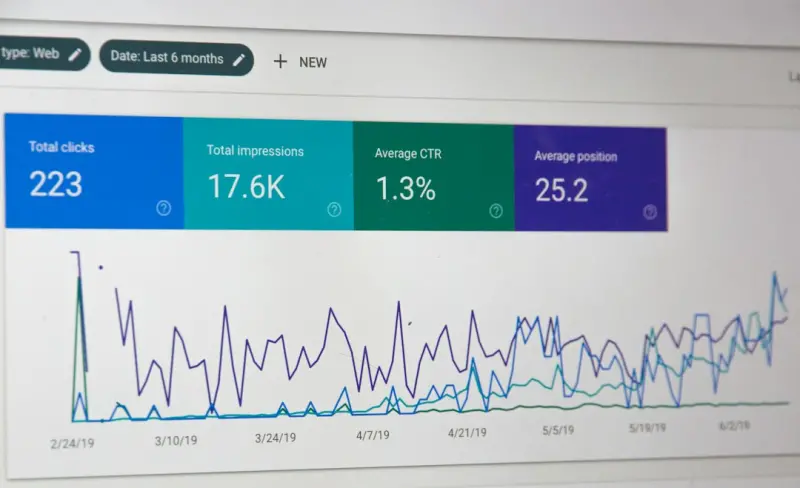
- Search Intent Signals – Use Google Search Console’s “Queries” report to see the exact phrasing that brings users to a page. Map those queries back to the intent layers.
- User Behavior Heatmaps – Tools like Hotjar reveal where visitors linger or click. If a key benefit isn’t getting attention, consider moving it higher in the hierarchy.
- Conversion Funnel Analysis – Track the path from landing to CTA. A high drop‑off after the hero section suggests the promise isn’t compelling enough.
Every data point is an opportunity to tweak the canvas. The iteration cycle is short: hypothesis → A/B test → refine. Over time, you build a repository of “what works for what intent,” which becomes a living knowledge base for future pages.
Case Study: Transforming a “Features” Page into an Intent‑Driven Hub
One of our SaaS clients had a traditional “Features” page that listed 12 product capabilities in a plain table. Rankings were modest, but bounce rates were through the roof.
We applied the three‑pillar framework:
- Intent Alignment – Identified three primary visitor intents: “Compare pricing,” “See real‑world use cases,” and “Understand integration options.”
- Interaction Flow – Re‑designed the page into three scroll‑triggered sections, each with a headline, a short video demo, and a CTA (“Request a Quote,” “View Case Study,” “Read Integration Guide”).
- Technical Trustworthiness – Implemented
SoftwareApplicationschema for each feature, compressed images, and added a CSP.
Results after eight weeks:
- Organic impressions increased by 42%.
- Average session duration rose from 1:12 to 3:08.
- Conversion rate (demo requests) jumped from 1.2% to 3.6%.
This example illustrates that when you treat on‑page SEO as an experience, the metrics that matter—engagement, trust, conversion—naturally improve.
Future‑Proofing: Preparing for the Next Wave of Search
Search engines are getting better at reading experience signals. The upcoming SGE updates will likely weigh dwell time, scroll depth, and interaction cues even more heavily. By embedding experience design into every on‑page element now, you future‑proof your content.
Here are two forward‑looking tactics:
- AI‑Generated Summaries – Use a controlled language model to generate concise, human‑readable snippets for each section. This helps both users and AI understand the page’s structure.
- Voice‑Ready Markup – Add
Speakableschema to key headings so that voice assistants can pull direct answers from your page.
These aren’t gimmicks; they’re ways to align your page with the multimodal future that Google Gemini and other AI platforms are championing. Speaking of which, the Google Gemini article dives deeper into how multimodal AI will reshape content strategy—something every on‑page SEO practitioner should keep on their radar.
Practical Checklist: Turn Theory into Action
Use this checklist the next time you sit down to craft an on‑page SEO strategy. It’s designed to be a quick reference that you can copy into your project management tool.
- Define 2‑3 primary user intents. Document them in your idea vault.
- Draft a headline hierarchy that mirrors the intent flow. H1 = promise, H2 = benefit, H3 = proof.
- Design a hero component with a clear CTA. Keep it above the fold.
- Add micro‑interactions. Hover states, scroll‑triggered highlights.
- Implement schema for each content block. Use
FAQPagefor Q&A sections. - Optimize Core Web Vitals. Test with PageSpeed Insights.
- Run a heatmap test. Adjust layout based on real user attention.
- Launch an A/B test. Compare original vs. experience‑centric version.
- Monitor SERP performance and engagement metrics. Iterate monthly.
Remember, the goal isn’t to chase every new algorithm tweak; it’s to consistently deliver an experience that satisfies human intent while ticking the technical boxes that search engines reward.
Closing Thoughts: SEO as Storytelling
When I first learned about SEO, I thought of it as a set of rules. Now I see it as a narrative framework. Every page is a short story, and the reader (human or machine) is looking for a satisfying ending. By aligning intent, crafting a thoughtful interaction flow, and reinforcing trust with solid technical foundations, you turn a sterile checklist into a compelling story—one that search engines are finally rewarding.
If you’re ready to move from “SEO as a chore” to “SEO as an experience,” start with one page. Map the intent, redesign the layout, and watch the metrics transform. The results will speak louder than any meta description ever could.

Laura Wilson is a freelance writer specializing in the dynamic and ever-evolving field of health. With a passion for translating complex medical information into accessible and engaging content, Laura brings a wealth of knowledge and a fresh perspective to topics ranging from preventative care and nutrition to cutting-edge research and innovative treatments.
Related Posts

Why On-Page SEO Still Matters in a Fast‑Paced World
Learn why aligning content, design, and technical tweaks with slow‑living principles creates stron... Read More

Designing On-Page SEO for Accessibility and Human‑Centric Experiences
Discover why accessibility is a vital on‑page SEO factor, with actionable steps, tools, and case s... Read More

Mastering On‑Page SEO: A Sprint‑Focused Blueprint for Higher Rankings
A fast‑paced, sprint‑inspired guide to mastering on‑page SEO, from keyword intent to Core Web ... Read More
Top Posts

5 Things to Consider Before You Purchase Kitchen Cabinets
Kitchen cabinets are more than just storage units; they are the backbone of your kitchen's functionality, the canvas for its aesthetic, and a significant invest...Read More
Discover How PR Supercharges Your Brand's Inbound Marketing Strategy
In an increasingly competitive digital landscape, brands are constantly seeking innovative ways to attract, engage, and convert their target audiences. Inbound ...Read More

Cultivating a Microbial Garden: Harnessing Soil Life for Thriving Plants
Learn how to nurture the hidden soil microbiome to boost plant growth, reduce chemicals, and create a resilient garden—simple steps, real results....Read More

When Your Refrigerator Becomes a Remote Team MVP
Smart appliances are turning into silent productivity partners for remote teams, offering real‑time data, automated alerts, and predictive insights that free ...Read More
0 Comments
Post Comment
You will need to Login or Register to comment on this post!