
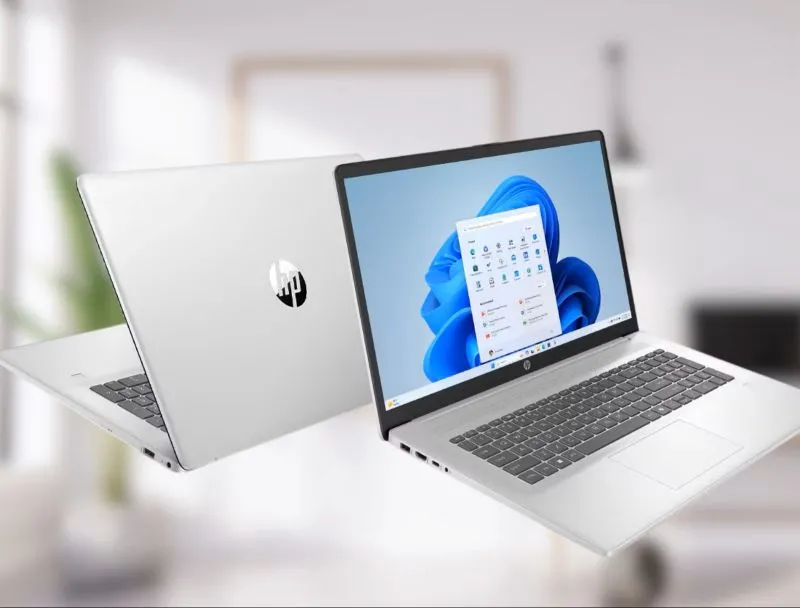
For years, the industry mantra was "smaller is better." We chased thinness, lightness, and portability above all else. But as the nature of work and play has shifted—with hybrid environments becoming the standard and high-fidelity media consumption moving from the living room to the home office-a counter-movement has emerged. The "big-screen" laptop, once dismissed as a clunky relic, has evolved into a powerhouse of productivity and immersion.
Finding the perfect 17-inch or 16-inch laptop is no longer about settling for a portable anchor; it is about finding a machine that serves as a true desktop replacement. Whether you are a creative professional editing 8K footage, an engineer running complex simulations, or a gamer seeking an expansive canvas, the journey to the perfect big-screen device requires a nuanced understanding of hardware synergy.
The Case for the Canvas
Why choose a large laptop in an era of ultra-portables? The answer lies in the "screen real estate" multiplier. A 17-inch display provides approximately 25% more usable workspace than a 15-inch model. This isn’t just about making icons look bigger; it’s about side-by-side multitasking without toggling between windows. It is about the visceral experience of a cinematic display that doesn’t require an external monitor to be productive.
However, moving to a larger form factor introduces a unique set of variables. When you move away from the constraints of a small chassis, you aren't just getting more glass; you are getting better thermal management, more ports, and often, higher wattage components.
Decoding the Big-Screen Landscape: The Major Players
The market for large-format laptops is currently dominated by a few key players, each catering to distinct user philosophies.
1. The Dell Precision and XPS Series: The Professional Standard
When one thinks of professional, reliable big-screen workstations, Dell is often the first name that comes to mind. The Dell XPS 17 serves as the gold standard for those who want a minimalist aesthetic paired with immense power. By utilizing thin bezels, Dell manages to pack a 17-inch display into a chassis that feels like a 15-inch device. For those in more technical fields, the Precision series offers ISV-certified hardware, ensuring that software like AutoCAD or SolidWorks runs with surgical stability.
2. The HP Envy and OMEN Series: The Balanced Workhorse
HP has mastered the art of vertical integration. The HP Envy 17 is arguably the best "all-rounder" on the market, offering a sleek, premium aluminum chassis that fits into a boardroom just as well as it does a design studio. Conversely, the HP OMEN series offers a distinct shift into high-performance territory, utilizing robust cooling systems that allow the internals to run at peak capacity for extended periods-essential for those who treat their laptops like desktop workstations.
3. The Asus ProArt and ROG Strix: The Innovator’s Choice
Asus has taken a more experimental approach, which is a boon for power users. The ProArt Studiobook series is a marvel of engineering, incorporating features like the physical dial for creative applications, directly addressing the needs of video editors and graphic designers. On the gaming side, the ROG Strix series exemplifies how a big screen can leverage a high refresh rate to create a truly immersive experience, often pushing the boundaries of what is possible in portable graphical performance.
4. The MSI Creator and Titan Series: The Performance Titan
If performance is the only KPI that matters, MSI stands largely unrivaled. MSI’s design philosophy is unapologetically powerful. Their big-screen laptops are often the first to feature the latest cooling technology, allowing them to squeeze every ounce of performance out of the CPU and GPU. For a user who prioritizes raw speed over thinness, an MSI Titan or Creator machine is essentially a high-end desktop squeezed into a folding frame.
The Silicon Heart: Choosing Between AMD and Intel
The processor debate has reached a fever pitch. For a long time, the narrative was that Intel owned the high-performance space, but the re-emergence of AMD has fundamentally changed that.
Modern AMD Ryzen processors have become the darlings of the power-efficiency movement. Their ability to deliver high-core-count multi-threaded performance—while producing significantly less heat than their direct competitors-makes them perfect for thin-and-light big-screen laptops. If your workflow involves long-duration rendering or heavy data crunching while on the move, an AMD-equipped machine likely offers better battery scalability.
Conversely, Intel’s latest architectures (specifically those with hybrid performance-core technology) remain incredibly strong when paired with tasks that require high burst speeds. If your work involves Adobe Creative Cloud or applications that are heavily optimized for Intel’s proprietary instruction sets, sticking with the blue team remains the safer, more optimized bet.
Critical Considerations Beyond the Specs
When shopping for a 17-inch machine, the specifications list is only half the story. You must look for "quality of life" features that define the experience of using a behemoth:
- Thermal Headroom: Large laptops have more space for heat pipes and fans. Research the thermal throttling limits of your chosen model. A laptop that cannot vent heat efficiently will eventually perform poorer than a smaller machine that stays cool.
- The I/O Array: The primary advantage of a big laptop is connectivity. Look for a machine that offers a robust selection of ports: Thunderbolt 4, HDMI 2.1, full-sized SD card slots, and multiple USB-A inputs. You should not need a dongle when your laptop is already two inches thick.
- Keyboard and Trackpad Ergonomics: A larger chassis should mean a full-sized keyboard with a numeric keypad. Use this to your advantage. Test the travel distance and the tactile feedback—a big-screen laptop is meant for long writing sessions or data entry.
- Display Panel Quality: Since the screen is the reason you are buying the laptop, do not compromise on the panel. Seek out OLED technology for deep blacks and color accuracy, or high-brightness Mini-LED for HDR workflows. Ensure the color gamut coverage (DCI-P3 or Adobe RGB) meets your professional requirements.
The Final Verdict: Finding Equilibrium
The perfect big-screen laptop is a compromise between the mobility of a portable computer and the capability of a workstation. It is not designed to be carried to a coffee shop every single day; it is designed to be the epicenter of your digital life.
Before you purchase, define your primary use case. If you are a mobile creator, prioritize the Dell or Asus ProArt lines for their display color science. If you are a gamer or a compute-heavy developer, look toward the MSI or HP OMEN lines for their thermal capacity. By aligning the brand’s engineering philosophy with your daily workload, you will find that the "big-screen transition" isn't a burden-it is an upgrade to your creative potential.
In the end, technology should be a tool that expands your capabilities rather than restricting your view. By choosing a high-performance, large-format laptop, you are choosing to work on a canvas that is as big as your ideas. Choose wisely, prioritize the cooling and connectivity, and you will find that the perfect laptop is not one that disappears into your bag, but one that commands your desk.

Shawn DesRochers is a certified Microsoft technician and Programmer with 30+ year's experience. He has written many reviews on computer related products, software, and SEO related topics. When he's not writing reviews he can be found at one of the Oldest Directories Online Blogging Fusion Business Directory which he is the CEO of.
Related Posts

Why Choosing the Right PC Matters More Than Chasing the Fastest Specs
Find out why the newest, fastest specs aren’t always the best choice and learn a smart, sustainabl... Read More

How to Connect Bluetooth Headphones to a Windows PC
In the modern digital landscape, seamless audio integration is no longer a luxury but a necessity. W... Read More

What is the Difference Between a Laptop and a Notebook?
In the ever-evolving landscape of personal computing, terminology can often become blurred, leading ... Read More
Top Posts

Why Edge‑First Hosting Is the New Competitive Edge for SaaS
Edge‑first hosting moves compute and caching closer to users, slashing latency, simplifying compliance, and unlocking real‑time features. This guide walks S...Read More

The Hidden Psychology Behind High‑Converting SEM Copy
Learn why tapping into human psychology, not just keywords, is the secret to creating SEM ads that click, convert, and keep customers coming back....Read More
Data‑Driven Storytelling: Turning SaaS Metrics into Magnetic Marketing
In this post, Tyler Johnson shows B2B SaaS marketers how to harvest product and customer data, craft human‑centric stories, and distribute them across the rig...Read More
Why Modern Web Hosting Is the Unsung Hero of Online Success
In today’s digital race, the right web host is your secret weapon—boosting speed, protecting data, and even supporting green initiatives. Dive into the tren...Read More
0 Comments
Post Comment
You will need to Login or Register to comment on this post!