
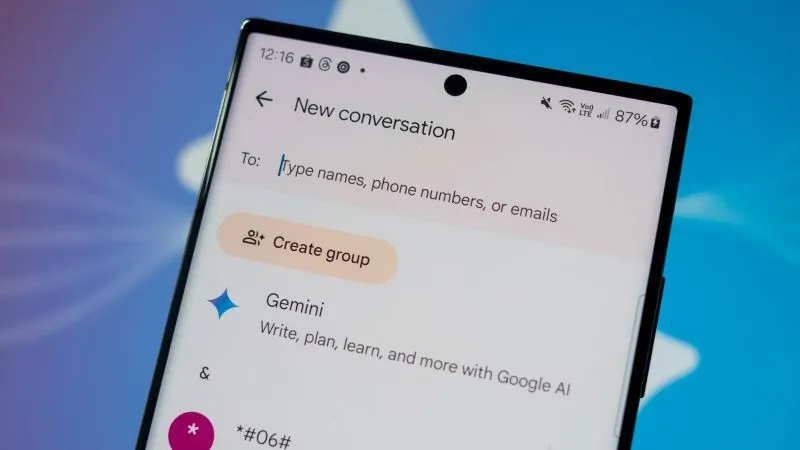
For over a decade, millions of smartphone users have relied on the default text messaging app pre-installed on their Galaxy devices. However, a major shift is officially underway in the mobile ecosystem. Samsung has announced that Samsung Messages is being retired as the default platform on new devices, pushing users toward a unified experience.
If you have been using this app for years, you might be wondering what this means for your precious text history. This transition is not just a minor update; it represents a fundamental change in how your device handles SMS, MMS, and RCS communication. To ensure you don't lose any important conversations, you must act before the July deadline.
Why the Transition to Google Messages Is Happening
The tech industry is moving toward a more standardized messaging protocol. While the native app served users well in the era of simple SMS, modern communication demands advanced features like high-quality media sharing, typing indicators, and end-to-end encryption. These are hallmarks of the Rich Communication Services (RCS) standard.
By moving to Google Messages, Samsung is aligning itself with the global standard for Android communication. This move ensures that all Android users—regardless of the brand of phone they carry—can enjoy a consistent, feature-rich experience. It effectively eliminates the fragmentation that previously existed between different Android manufacturers.
What This Means for Your Conversations
You might worry that your old messages will simply disappear when the app is phased out. Fortunately, the migration process is designed to be relatively seamless. Most modern Galaxy devices allow for an easy transition, pulling your existing threads into the new interface without deleting your data.
However, relying on automated processes without manual verification can be risky. If you have years of sentimental messages, work-related discussions, or critical information stored in your current app, taking proactive steps is the best way to ensure nothing is lost during the switch.
Preparing for the Switch Before July
The deadline of July marks a significant milestone in this rollout. Samsung is increasingly prioritizing the Google-developed app on its latest hardware, and support for the legacy app is winding down. To prepare, you should start by auditing your current storage and clearing out unnecessary junk messages.
Cleaning up your inbox makes the transfer much faster and less prone to errors. Delete old promotional texts, spam messages, and one-time verification codes that you no longer need. This simple step ensures that only the data you actually value is migrated to your new messaging environment.
Backing Up Your Data Locally
Before you commit to the full transition, it is wise to create a local backup. Samsung Cloud previously handled this, but modern users should rely on Smart Switch or specialized third-party tools to keep a copy of their SMS database. This acts as a safety net in case something goes wrong.
- Open your device settings and navigate to "Accounts and Backup."
- Select "Back up data" and ensure "Messages" is checked.
- Use a PC-based backup tool if you prefer to have a physical file on your computer.
- Verify that the backup completed successfully before proceeding to the next step.
How to Seamlessly Migrate Your Messages
Once you have backed up your data, it is time to embrace the new standard. The switch is largely automated, but you need to trigger the process by setting the new app as your default. This allows the system to read your existing SMS database and import it into the new interface.
When you open the new messaging application for the first time, you will likely be greeted by a prompt asking if you would like to set it as your primary client. Agreeing to this prompt is the first step in centralizing your communication. The app will then index your existing messages.
Ensuring All Threads Are Accounted For
After the migration, spend a few minutes scrolling through your history. You should see all your familiar contacts and ongoing threads. If you notice any missing conversations, don't panic. Sometimes, the initial indexing process takes a few minutes to complete in the background.
If you encounter persistent issues, try clearing the cache of the new app or restarting your device. These small actions often force the system to re-scan the message database, bringing back any missing threads that may have been temporarily hidden during the initial sync process.
The Benefits of the New Messaging Standard
While change can be difficult, the transition brings significant benefits that you will appreciate immediately. The new platform offers a much faster interface, better search functionality, and more robust integration with other Google services. You can easily find specific messages from months ago with the improved search bar.
Furthermore, the shift to RCS is a massive upgrade for security. You will notice that many of your conversations are now end-to-end encrypted, which was not always the case with the older SMS format. This keeps your private data away from prying eyes and ensures that your messages remain private.
Advanced Features You Will Enjoy
Aside from security, there are several quality-of-life improvements that make the change worth it. You will likely find the following features to be major upgrades over your old texting experience:
- High-Resolution Media: Send and receive photos and videos without the typical compression that ruins quality.
- Cross-Device Sync: Easily continue your conversations on your tablet or web browser.
- Smart Replies: Save time with suggested responses based on the context of the incoming message.
- Better Group Management: Add or remove members from group chats with much greater ease.
Common Troubleshooting Tips for the Migration
If you find yourself struggling with the transition, you are not alone. Many users report minor hiccups when switching apps. One common issue is that notifications might not appear correctly at first. Always double-check your notification settings in the app menu to ensure alerts are toggled to "on."
Another common concern involves RCS activation. Sometimes, your phone number needs to re-verify its connection to the Google servers to enable advanced features. This usually happens automatically, but if you see a "waiting to connect" status, give it a moment or toggle your Wi-Fi off and on.
Dealing with Persistent Sync Issues
If you are still unable to see your messages after a few hours, check if there is an update available in the Play Store. Outdated versions of the app often lack the necessary permissions to pull data from your internal storage. Updating ensures compatibility with your current Android version.
Lastly, ensure that the legacy app has been properly disabled rather than just ignored. Leaving two apps fighting for control over your SMS database can lead to lost incoming messages or fragmented threads. Setting the new app as the absolute default prevents these conflicts entirely.
What Happens If You Do Nothing?
Some users might be tempted to simply ignore the prompts and keep using their current app. However, Samsung has been clear that this is a long-term retirement phase. Eventually, the older app will no longer receive security updates, leaving your data vulnerable to exploits or bugs.
Staying on an outdated messaging platform is never a good idea. As new Android updates roll out, the old app will inevitably face compatibility issues, potentially crashing or failing to send messages. Moving now ensures that you stay ahead of these technical hurdles before they become critical problems.
The Importance of Staying Updated
Modern mobile security is a fast-moving target. By migrating to the supported platform, you benefit from the latest patches and security enhancements provided by Google. This is essential for protecting your personal information, especially if you use your phone for banking or professional communication.
Do not view this transition as a chore, but rather as an upgrade to your digital security posture. By taking the time to migrate your data correctly, you are future-proofing your communication and ensuring that your device remains a secure, efficient tool for your daily life.
Final Thoughts on the Messaging Shift
The retirement of the legacy messaging app marks the end of an era, but it opens the door to a much more integrated future. While it is natural to be concerned about the safety of your message history, the tools provided make the move straightforward and secure.
Remember that the July deadline is fast approaching. Whether you have a handful of threads or thousands of messages, start your backup and migration process today. By being proactive, you can ensure a smooth transition and enjoy the enhanced features of your new messaging experience without any unnecessary stress.
Ultimately, this change is about making your smartphone smarter. Embrace the new features, enjoy the faster performance, and rest easy knowing that your conversations are safely stored in their new home. Your future self will thank you for taking the time to manage this transition properly.

Tyler Johnson is a seasoned freelance writer with a keen eye for detail and a passion for crafting compelling narratives. His years of experience have honed his ability to adapt his style to suit diverse client needs and project requirements.
Related Posts
Safeguard Your Digital Life: A Comprehensive Guide to Backing Up and Restoring Your Android Phone
In today's interconnected world, our Android smartphones have become indispensable tools, holding no... Read More

Phone‑First Productivity: Turning Your Pocket Device into a Strategic Ally
Discover practical micro‑habits, AI‑powered camera tricks, and automation strategies that let yo... Read More

Modular Magic: Reimagining Smartphones for a Sustainable Future
Modular smartphones let you swap out batteries, cameras, and more, turning your phone into a sustain... Read More
Top Posts

Why are used car prices rising and becoming less affordable
The United States and global automotive markets are undergoing a fundamental transformation. Historically, the used car sector was characterized by predictable ...Read More

Bringing the Outdoors In: How Biophilic Design Transforms Modern Interiors
Discover the power of biophilic design—using plants, natural light, water, and organic textures—to create healthier, more inspiring interiors for homes, off...Read More

Unlocking the Hidden Power of Structured Data for SEO Success
Explore why structured data is essential for modern SEO, how to implement it effectively, and the measurable impact it can have on rankings and user engagement....Read More
Why Speed, Security, and Sustainability Are the New Pillars of Modern Web Hosting
Explore the rise of edge‑centric, sustainable, and secure web hosting, and learn how these trends boost performance, rankings, and user trust for modern sites...Read More
0 Comments
Post Comment
You will need to Login or Register to comment on this post!