
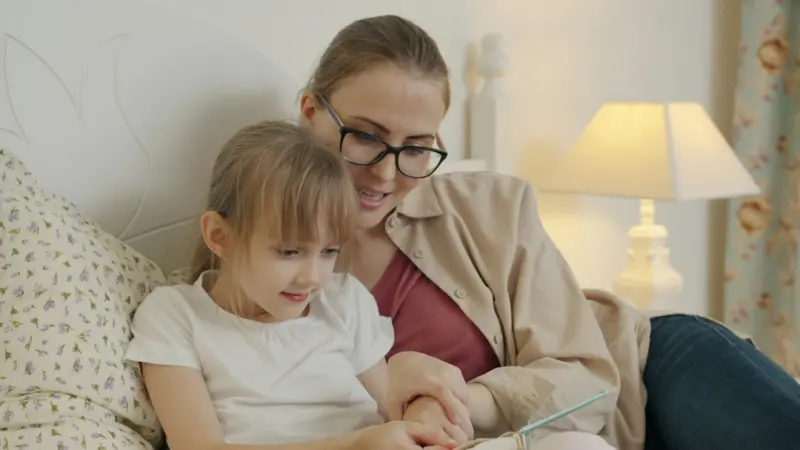
When I first became a mom, I thought I’d mastered the art of parenting after surviving the “no‑sleep‑for‑two‑weeks” phase and memorizing every line from Sesame Street. Fast forward a few years, and the landscape has shifted under my feet. The toys that once squeaked and rolled are now silent, sleek rectangles that glow with endless possibilities—and endless distractions. The challenge isn’t just keeping kids occupied; it’s about shaping that digital playground into a workshop for real‑world skills.
Why the Parenting Playbook Needs a Refresh
Traditional parenting advice often reads like a relic from a pre‑Internet era: “Limit screen time,” “Encourage outdoor play,” “Read a book before bed.” Those nuggets are still valuable, but they ignore a crucial reality—our children are native digital natives, and the screens they adore are not going anywhere. Instead of fighting the tide, I’ve learned to ride it, turning what used to feel like a threat into a teaching moment.
Consider this: a six‑year‑old can navigate a tablet as effortlessly as she can tie her shoes. If we keep telling her to stay away from that device, we’re effectively telling her that the world she already knows is off‑limits. The modern parent’s mission is to reframe digital interaction from passive consumption to active creation.
From Curated Content to Co‑Creation
One of the most profound shifts I’ve embraced is moving from handing my kids curated content to inviting them into the process of co‑creating it. Instead of letting an algorithm decide what they watch, we sit together and explore adaptive family spaces where screens become collaborative tools.
- Story‑building apps: Platforms like Toontastic let kids plot characters, voice dialogues, and animate scenes. It’s not just entertainment; it’s a mini‑screenwriting class.
- DIY music mixers: Simple drum‑beat generators or loop‑based tools turn a rainy afternoon into a jam session, teaching rhythm, timing, and basic audio editing.
- Mini‑coding games: Visual programming blocks (think Scratch) turn abstract logic into colorful puzzles, building problem‑solving muscles without the jargon.
When my daughter, Maya, decided to “make a movie about our family,” we transformed our living room into a storyboard studio. She chose the plot, assigned roles (Dad as the clumsy astronaut, Mom as the brave explorer), and filmed with a tablet on a tripod. The result? A 7‑minute film that sparked discussions about narrative structure, sequencing, and even basic cinematography. The screen wasn’t a distraction; it was the canvas.
Turning Screen Time Into Skill Time
Every minute spent scrolling can be a minute spent learning—if we set up the right scaffolding. Here’s a framework I call the Skill‑Time Matrix:
- Creative Expression: Drawing apps, music makers, video editors.
- Critical Thinking: Puzzle games, coding platforms, strategy board‑games adapted for tablets.
- Social Connection: Safe, moderated video chats with grandparents, collaborative story‑building with peers.
- Physical Integration: Augmented‑reality (AR) games that require movement, like treasure hunts that blend the digital map with real‑world landmarks.
By categorizing activities, we can balance the day: 30 minutes of creative expression, 20 minutes of critical thinking, and so on. The key is intentionality. When Maya asks to watch a video, I ask, “Do you want to watch, or do you want to make something about it?” Often, she chooses the latter, and a simple YouTube clip becomes a springboard for a drawing session or a short script.
Negotiating the New “Family Tech Contract”
Contracts sound corporate, but a family tech contract can be a surprisingly effective tool. It’s a living document that outlines expectations, boundaries, and mutual responsibilities. Here’s a skeleton we use:
- Screen Zones: Certain rooms (e.g., kitchen, bedroom at night) are screen‑free zones.
- Time Blocks: Specific hours dedicated to skill‑time, family‑time, and free‑play.
- Content Review: Parents and kids co‑choose apps and videos, reviewing them together weekly.
- Responsibility Clause: If a child finishes a skill‑time activity, they earn a small “fun‑time” credit, reinforcing a sense of achievement.
We sit down every Sunday, print the contract, and sign it with colored markers. The act of signing makes the agreement feel official, and the weekly review ensures it evolves with our children’s growing interests.
Practical Tools for Modern Families
Finding the right digital tools can feel overwhelming. Below is a curated list of my go‑tos, each selected for its educational value and kid‑friendly design:
- StoryJumper: Simple drag‑and‑drop book creator that lets kids publish their own picture books.
- Kodable: Early coding lessons disguised as colorful adventures.
- BrainPOP: Short, animated lessons on science, history, and more—perfect for quick knowledge bites.
- Duolingo Kids: Language learning with games and rewards, ideal for budding polyglots.
- GoNoodle: Movement‑focused videos that get kids up and active, merging screen time with physical activity.
We rotate tools every month to keep the experience fresh, and we always start with a brief “why” discussion—explaining how each tool supports a skill Maya wants to develop.
Balancing Digital Safety With Exploration
Safety is still a cornerstone. While I want Maya to explore, I also need to protect her from the darker corners of the internet. That’s where digital‑first safety strategies come into play. Instead of relying solely on parental controls, we teach her to recognize red flags, ask questions, and report anything uncomfortable.
We practice “digital body language”: if a message feels “off,” we pause, discuss, and decide together how to respond. This empowers Maya to become her own safety net, rather than a passive recipient of rules.
Fostering Resilience in a Connected World
Resilience isn’t just about bouncing back from a scraped knee; it’s also about navigating online setbacks—like a failed game level or a disliked post. I weave in principles from daily resilience habits to help Maya develop a growth mindset.
Every evening, we do a quick “digital debrief”: what went well, what felt frustrating, and one thing she learned. This simple routine turns a moment of disappointment into a reflective practice, reinforcing the idea that setbacks are stepping stones.
Designing Adaptive Family Environments
Physical space influences digital behavior. By creating adaptive family spaces, we make it easier for kids to transition between screen‑based and screen‑free activities. Our living room now features a low‑profile media console with hidden cords, a cozy reading nook, and a movable whiteboard that doubles as a brainstorming station.
When Maya wants to switch from a video lesson to a hands‑on experiment, the transition is seamless—she simply moves her tablet to the whiteboard area and starts sketching out ideas. The environment subtly encourages fluid movement between mediums, reinforcing the notion that screens are tools, not destinations.
Looking Ahead: Parenting in the AI Era
Artificial intelligence is poised to become a household companion, from voice‑activated assistants to AI‑powered learning platforms. While the technology promises personalization, it also raises questions about data privacy and algorithmic bias.
My approach is proactive:
- Transparency: I sit with Maya whenever an AI suggests content, explaining why it’s recommended.
- Data Literacy: We discuss what data is, how it’s collected, and why it matters.
- Human Oversight: No AI decision is final without parental review. We treat AI as a co‑pilot, not the pilot.
By demystifying AI early, we equip our children with the critical thinking skills needed to navigate an increasingly algorithmic world. The goal isn’t to ban AI but to integrate it responsibly, ensuring it amplifies curiosity rather than curtails it.
In the end, the modern parenting journey feels less like a battle and more like a collaborative adventure. Screens are no longer the enemy; they’re the new set of crayons, drums, and building blocks. By setting clear boundaries, choosing purposeful tools, and fostering an environment that prizes creation over consumption, we can turn today’s digital flood into a river of opportunity.
So the next time your child asks for “just one more video,” try asking, “What would you like to create with that video?” You might be surprised at the masterpiece that emerges.

Freelance writer with a flare for everything. I am passionate about topics I write crafting stories and compelling content that connect with audiences. Journeying through the realms of creativity as a freelance creator. #WriterLife #ContentCreator
Related Posts
Turning Everyday Chaos into Creative Family Time
Explore how to transform household messes into collaborative stories, use micro‑rituals to ease tr... Read More

Parenting in the Digital Age: Practical Strategies for Modern Families
A fresh look at modern parenting, blending tech‑savvy tactics with timeless emotional coaching. Le... Read More

Balancing Screens and Snuggles: A Modern Parent’s Journey
Discover how to blend screen time, holistic health, and community resources into a balanced parentin... Read More
Top Posts

While Everyone Loves Microsoft 365, There Are Alternatives
In today’s business environment, productivity software has become an essential cornerstone of organizational success. When it comes to office productivity sui...Read More

How to Prevent a Data Security Breach
In the relentlessly evolving digital landscape, data has emerged as the most critical asset for individuals, businesses, and governments alike. From proprietary...Read More

Story‑Powered Growth: How Teens Can Build Confidence and Community
A teen who learns to craft and share stories not only sharpens empathy but also gains confidence, tech fluency, and even financial insight. This guide offers ac...Read More
Cultivating a Data‑Driven Micro‑Garden for Urban Creatives
Discover a fresh, data‑informed approach to urban gardening that blends design thinking, sensor tech, and sensory flow to enhance productivity and well‑bein...Read More
0 Comments
Post Comment
You will need to Login or Register to comment on this post!