

When I first stepped into a coffee shop and watched a barista hand a customer a menu that changed its layout based on the person’s eye‑movement, I realized we were witnessing the next wave of web design—one that isn’t just responsive to screen size, but responsive to brain wiring. As a designer who has spent a decade juggling brand guidelines, performance budgets, and the ever‑shifting expectations of stakeholders, I’ve learned that true inclusivity means designing for the full spectrum of neurodiversity. This post is my deep‑dive into how we can make the web a friendlier place for people with ADHD, dyslexia, autism, and other cognitive differences, without compromising on aesthetics, speed, or business goals.
Why Neurodiversity Matters in Web Design
Neurodiversity isn’t a buzzword; it’s a reality for roughly 15‑20% of the global population. While traditional accessibility guidelines (think WCAG) do a solid job addressing visual, auditory, and motor impairments, they often fall short for cognitive challenges. A site that meets AA compliance can still be a labyrinth for someone with attention‑deficit hyperactivity disorder (ADHD) who needs clear visual hierarchies, or for a dyslexic reader who benefits from specific typography choices.
From a business perspective, the payoff is immediate. Inclusive designs lead to lower bounce rates, higher conversion, and stronger brand loyalty. In an era where every pixel can affect the bottom line, ignoring neurodiverse users is not just an ethical oversight—it’s a missed revenue opportunity.
Key Principles for Neurodiverse‑Friendly Interfaces
- Predictable Layouts: Reduce the cognitive load by keeping navigation structures consistent across pages. Users should never wonder where the “Contact” button lives.
- Chunked Information: Break content into bite‑size sections with clear headings. This helps users with short attention spans scan and retain information.
- Controlled Motion: Excessive animations can be distracting or even triggering. Offer an easy “reduce motion” toggle.
- Typography Tailored for Reading: Use dyslexia‑friendly fonts (like OpenDyslexic) and ensure sufficient line height and spacing.
- Color Contrast with Purpose: Beyond meeting the 4.5:1 ratio, use color to signal hierarchy, not just decoration.
- Feedback Loops: Immediate, clear feedback on interactions (e.g., button clicks) reassures users that the system is responding.
Design Systems: The Backbone of Consistency
One of the biggest challenges when aiming for neurodiverse‑friendly design is maintaining consistency at scale. This is where a robust evolving design system becomes a game‑changer. By codifying layout grids, typographic scales, and interaction patterns, you ensure that every new page or feature inherits the same cognitive‑friendly defaults.
Think of your design system as a living document that not only houses brand colors and components but also embeds accessibility heuristics specific to neurodiversity. For example, a button component can come with an optional reduceMotion prop, automatically disabling any entrance animation. When your developers pull this component, the decision has already been made for them—consistency at the code level translates directly to consistency in user experience.
Practical UI Tweaks That Make a Difference
1. Simplify Navigation Menus
Dropdowns with multiple nested layers can be overwhelming. Replace them with a mega‑menu that shows top‑level options side‑by‑side, or, better yet, a sticky side navigation that remains in view as users scroll. Adding a clear “Back to Top” button also helps those who lose track of their place on long pages.
2. Use Visual Anchors
Icons paired with text act as visual anchors, aiding users who scan rather than read linearly. For example, a shopping cart icon next to “My Orders” instantly tells the user what to expect, even before they read the label.
3. Provide Alternative Interaction Paths
Keyboard shortcuts, voice commands, and even simple “skip to content” links give users multiple ways to navigate. This is especially valuable for users who experience motor fatigue or prefer auditory cues.
4. Offer Customizable UI Settings
Implement a small “Preferences” panel where users can toggle high‑contrast mode, larger fonts, or a reduced‑motion setting. Store these preferences in local storage or via user profiles so the experience persists across sessions.
5. Optimize Form Design
Forms are notorious pain points. Reduce the number of required fields, group related inputs, and provide inline validation so users get instant feedback. Use clear, concise language—avoid jargon that could confuse or overwhelm.
Testing With Real Users, Not Just Checklists
Automated tools can flag missing alt text or insufficient contrast, but they won’t catch the subtle frustrations a neurodiverse user might face. Conduct usability sessions with participants who have ADHD, autism, dyslexia, or other cognitive profiles. Observe how they interact, note where they hesitate, and ask open‑ended questions about their mental workload.
When you iterate based on these insights, you’ll find that many of the improvements—like clearer headings or reduced motion—also benefit neurotypical users. This phenomenon, sometimes called the “curb‑cut effect,” shows that designing for a specific group often raises the overall quality of the experience.
Balancing Performance and Inclusivity
There’s a myth that adding accessibility features slows down a site. In reality, many neurodiverse‑friendly tweaks—like simplifying layouts, reducing heavy animations, and optimizing typography—can boost performance. A leaner page loads faster, which benefits every visitor and improves SEO. Speaking of SEO, consider how search engines interpret content meant for neurodiverse users.
By structuring your HTML with semantic headings (<h2>, <h3>, etc.) and using descriptive link text, you not only aid screen readers but also give crawlers clearer signals about page hierarchy. A well‑structured page can enhance “zero‑click” visibility, especially when paired with zero‑click search strategies that surface rich snippets directly in the SERP.
Future‑Proofing: AI‑Assisted Personalization
Emerging AI tools can analyze user behavior in real time and adapt interfaces on the fly. Imagine a homepage that detects a user’s scrolling speed and adjusts content density accordingly, or a system that offers a “focus mode” when it senses a high‑frequency eye‑movement pattern typical of ADHD. While these technologies are still nascent, early adopters can experiment with rule‑based personalization—for instance, serving a simplified version of a product page to users who have opted into a “low‑stimulus” mode.
It’s crucial, however, to maintain transparency. Users should know when the site is adapting itself and retain control to override any AI‑driven changes. Trust is built when you give power back to the user, not when the system makes silent decisions.
Case Study: A SaaS Dashboard Redesign
One of our clients—a B2B SaaS platform—noticed a spike in churn among users who flagged “information overload” during onboarding. We approached the redesign with neurodiversity in mind:
- Audit the Existing UI: We mapped out every interaction, noting where users paused or back‑tracked.
- Introduce Visual Hierarchy: We re‑ordered panels so the most critical metrics appeared at the top, using larger fonts and distinct background colors.
- Reduce Motion: All animated charts now have a “static” fallback that users can enable with a toggle.
- Offer Custom Layouts: Users can choose a “compact” or “expanded” view, storing their preference in their profile.
- Iterative Testing: We ran A/B tests with a group of neurodiverse participants, measuring task completion time and satisfaction scores.
The result? A 23% increase in task efficiency, a 17% drop in churn, and an overall NPS boost of 8 points. More importantly, the client reported positive feedback from users who hadn’t previously voiced their challenges, confirming that the redesign had opened the doors for a broader audience.
Getting Started: A Checklist for Designers
- Audit current typography for readability; consider dyslexia‑friendly options.
- Implement a “reduce motion” toggle and test with motion‑sensitive users.
- Standardize heading structures (
<h2>,<h3>) across all pages. - Offer high‑contrast and larger‑font themes in your design system.
- Include clear, descriptive link text—avoid generic “click here”.
- Run usability sessions with neurodiverse participants before launch.
- Document all neurodiversity considerations in your design system for future developers.
Conclusion: A Design Ethos for the Whole Brain
Web design has long been about visual appeal and functional performance. The next frontier is designing for the whole brain—recognizing that users process information differently and that those differences are not obstacles but opportunities for innovation. By embedding neurodiverse‑friendly principles into our design systems, testing with real users, and leveraging emerging AI tools responsibly, we can create digital experiences that feel intuitive for everyone.
In my own practice, I’ve seen how a single tweak—like adding a clear visual anchor—can turn a confusing form into a seamless journey. When we scale those small wins across an entire product, the impact multiplies, delivering not just compliance, but genuine delight.
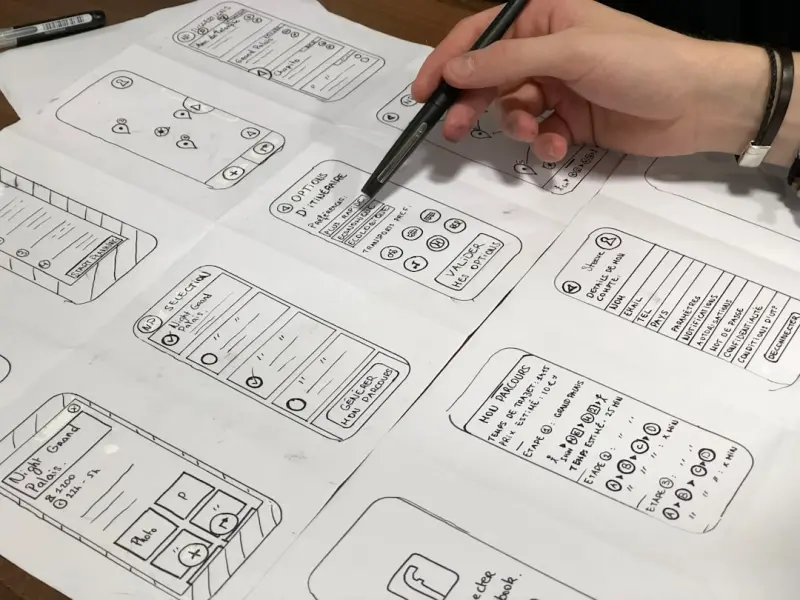
So, the next time you sit down to sketch a wireframe, ask yourself: Does this layout respect diverse cognitive styles? If the answer is yes, you’re not just building a website—you’re building a more inclusive internet.

Karen Edwards is a seasoned freelance writer with a passion for all things furry, feathered, and scaled. With a dedicated focus on pets, she brings a wealth of knowledge and a keen eye for detail to her writing.
Related Posts

Beyond the Grid: Creative Web Design Ideas That Inspire Innovation and Engagement
In the rapidly evolving digital landscape, the distinction between functional necessity and artistic... Read More
Designing for Cognitive Flow: How Web Interfaces Can Boost Human Focus
A deep dive into designing web experiences that nurture cognitive flow through contextual clarity, r... Read More

The Intersection of Web Design and Sustainable Living: A New Era of Digital Aesthetics
The intersection of web design and sustainable living is an exciting and rapidly evolving field. Lea... Read More
Top Posts

The Quiet Power of Personal Data Hygiene: A Proactive Guide to Online Safety
Online safety is more than a compliance checklist; it’s a daily habit and cultural mindset. This guide explores micro‑behaviors, AI‑driven defenses, and p...Read More

5 Simple Approaches to Shopping Smarter
In an era of relentless consumerism, where targeted ads flood our feeds and new products constantly vie for our attention, the act of shopping can feel less lik...Read More

Shared Hosting Reimagined: Power Moves for Modern Web Ventures
Shared hosting can still be a strategic launchpad for SaaS products when paired with smart caching, CDN usage, and layered security, offering speed, low cost, a...Read More

The Convenience Conundrum: Analyzing the Nutritional Profile and Palatability of Instant Noodle Products
Instant noodle products, often colloquially referred to as "Ramen noodles" or, confusingly, "Roman noodles," represent a significant global food phenomenon. Ori...Read More
0 Comments
Post Comment
You will need to Login or Register to comment on this post!