
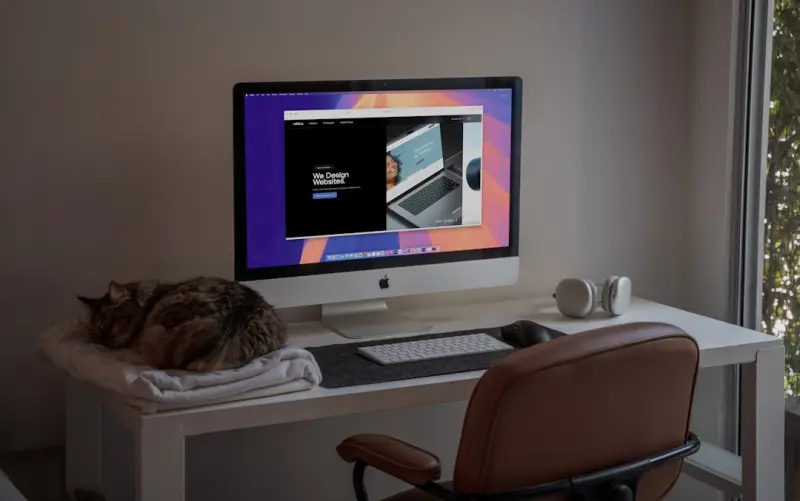
Why Your Pet Deserves a Seat at Your Desk (and How It Can Power Your Productivity)
When I first set up my home office, my cat, Luna, claimed the warm spot by my monitor as her kingdom. I tried to shoo her away, but every time I turned my back, she was already perched on the keyboard, blinking at me as if demanding a meeting. That tiny rebellion sparked a revelation: pets aren’t just adorable distractions—they’re potential allies in the remote‑work arena. If you’re like me—juggling client calls, sprint reviews, and a mischievous furry friend—designing a pet‑friendly workspace isn’t a luxury; it’s a strategic move.
The Hidden ROI of a Pet‑Friendly Setup
Let’s talk numbers. Studies show that employees who bring pets to work (or work alongside them at home) report 15‑20% lower stress levels and up to 12% higher engagement. Those aren’t just feel‑good metrics; they translate into fewer sick days, sharper focus, and a healthier bottom line. When Luna curls up on my chair, my heart rate steadies, and I’m suddenly reminded that the next sprint deadline isn’t a looming threat but a challenge I’m ready to tackle.
Step 1: Map Out Zones—Your Desk, Their Playground
First things first: treat your floor plan like a mini‑map. I borrowed a trick from strategic planning playbooks and divided my space into three zones:
- Focus Zone – The primary work surface where you need minimal interruptions.
- Pet Zone – A designated area with a cozy bed, toys, and a water bowl.
- Transition Zone – A shared border where you can interact without derailing a meeting.
By giving Luna a clear “home base,” I’ve reduced the number of times she jumps onto my laptop mid‑presentation. The key is consistency; pets thrive on routine, and so does your workflow.
Step 2: Choose the Right Furniture (and Keep It Stylish)
Invest in furniture that serves both humans and animals. A sturdy, height‑adjustable desk with a built‑in cable management tray keeps cords tidy—no more accidental chew‑throughs. Pair it with a sleek, modular pet couch that slides under the desk when you need extra legroom. Think of it as a dual‑purpose design: aesthetics for your Zoom background and durability for your dog’s claws.
Step 3: Tech That Keeps Them Safe (and Your Data Safer)
Pets love to explore, and that curiosity can lead them to paw at power cords or, worse, accidentally trigger a reboot. Here’s a quick tech checklist:
- Surge‑protected outlets with tamper‑resistant covers.
- Cable organizers that conceal power strips—think of them as the security fence around your digital pasture.
- Bluetooth‑enabled pet cameras that let you check on your buddy without leaving the meeting.
If you’re already running a SaaS product, consider applying the same mindset you use for insightful guide to your home office: layer protection, monitor health, and automate alerts (a simple “pet‑detected” script on your smart plug can notify you if the heater is left on).
Step 4: Sound Management—Because Meows Are Not Mic Feedback
Sound can be a silent productivity killer. While Luna’s purrs are therapeutic, a sudden bark or a cat’s midnight sprint can derail a client call. Solutions:
- Acoustic panels or foam tiles on the walls absorb ambient noise.
- White‑noise machines that mask unexpected animal sounds.
- Headset with active noise cancellation—your ears get the focus, your pet gets the love.
It’s the same principle we use in the real‑time, privacy‑centric frameworks for our products: isolate critical signals from background chatter.
Step 5: Schedule Play‑Breaks (Your New “Sprint Retrospectives”)
One of the biggest myths is that pets are a constant distraction. In reality, short, intentional play sessions boost dopamine for both you and your companion. I adopt a “Pomodoro‑Pet” technique: 25 minutes of focused work, followed by a 5‑minute fetch or laser‑pointer sprint. It’s a win‑win: you return to the screen refreshed, and your pet gets the exercise they crave.
Step 6: Hygiene Hacks—Keep the Office (and the Litter Box) Fresh
Let’s face it: a clean environment fuels clear thinking. Here’s a quick hygiene routine that fits into a busy day:
- Morning sweep of pet hair using a cordless handheld vacuum.
- Weekly deep‑clean of the pet zone with enzymatic cleaners that neutralize odors without harsh chemicals.
- Automatic litter box with self‑cleaning features—think of it as the auto‑scale for your cat’s waste management.
These steps prevent the dreaded “pet‑odor” that can ruin a client’s impression when you’re on a video call.
Step 7: Leverage the Emotional Bond for Creative Boosts
Pets are masters of presence. When Luna sits on my lap during a brainstorming session, I’m forced to think more visually—her paws patter like a metronome, guiding my thoughts. I’ve found that a short cuddle before a major pitch can shift my mindset from “analysis paralysis” to “creative flow.” If you’re skeptical, try it: set a timer for two minutes, cuddle your pet, and note any change in your idea generation rate.
Step 8: Turn Your Pet Into a Brand Ambassador (When Appropriate)
In the SaaS world, authenticity resonates. If your company culture embraces pets, why not let your own furry friend make a cameo in your brand’s social content? A short, well‑crafted video of Luna “testing” a new UI feature (with a toy mouse, of course) can humanize your brand and spark engagement. Just remember to keep it relevant and avoid over‑doing the cuteness—authenticity trumps gimmick.
Step 9: Future‑Proof Your Space for Growing Families (of Pets)
Thinking long‑term? As your pet family expands, you’ll need modular solutions. Choose a desk with a flex‑track that can accommodate additional cable trays for new devices (like a pet‑monitoring hub). Opt for pet furniture that’s stackable or collapsible, ensuring you can reconfigure the layout without a full remodel.
Step 10: Reflect and Iterate—Your Workspace Is a Living System
Just like a SaaS product, a pet‑friendly office requires continuous improvement. After a month of experimentation, ask yourself:
- Which zones are most used?
- Do I still get interrupted during key meetings?
- Is my pet’s wellbeing improving?
Gather feedback (yes, even from the cat) and adjust. Maybe Luna needs a higher perch, or perhaps your dog prefers a different type of chew toy to keep him occupied during calls. Iterate, test, and document the changes—treat it as your personal “product backlog.”
Bringing It All Together: The Pet‑Friendly Productivity Loop
When you blend thoughtful design, smart tech, and intentional habit‑building, you create a virtuous circle:
- Comfortable pet environment reduces anxiety for both parties.
- Reduced interruptions lead to deeper work states.
- Higher engagement translates into better project outcomes.
- Positive brand perception when you showcase authentic pet moments.
This loop mirrors the product lifecycle of a well‑engineered SaaS solution: you identify a need, design a solution, test, and iterate. The only difference is your “user base” now includes a whiskered colleague who occasionally walks across the keyboard to remind you that life is more than just KPIs.
Final Thoughts: Embrace the Chaos, Harness the Joy
Remote work has blurred the lines between professional and personal spaces. Instead of fighting that blur, lean into it. A pet‑friendly office doesn’t mean you sacrifice professionalism; it means you’re acknowledging the full spectrum of human (and animal) experience. By applying strategic design principles, leveraging technology, and cultivating mindful habits, you can turn your home office into a thriving ecosystem where both you and your pet flourish.
Ready to redesign your workspace? Start by sketching out your zones, invest in a few smart accessories, and watch as your productivity—and Luna’s tail‑wagging—reach new heights.

Jody Henderson is a passionate freelance writer, driven by a love for storytelling and a keen eye for detail. With a versatile skillset, she crafts compelling content across a variety of niches, from engaging blog posts to informative articles and persuasive marketing copy.
Related Posts
Why Your Home Office Needs a Furry Co‑Pilot: Boosting Productivity and Well‑Being
A pet at your home office isn’t a distraction—it’s a productivity ally. Learn how to create a ... Read More

The Paws-itive Impact of Sustainable Living on Pet Care
Sustainable living has a profound impact on pet care, from reducing waste and promoting animal welfa... Read More
How Pets Are Redefining Modern Living in 2024
Mei Chen shares how today’s pets are shaping work, wellness, and home life, offering practical tip... Read More
Top Posts

Adaptive Learning with Gutenberg: Building Dynamic WordPress Portals
Learn how to leverage Gutenberg’s block system to create adaptive, data‑driven learning portals on WordPress, boosting engagement and scalability for corpor...Read More

Digital Confidence for Seniors: Turning Tech Into a Lifeline
Discover how seniors can overcome tech anxiety, stay safe, and transform devices into social lifelines for a richer, more connected life....Read More

Turning TikTok Into a Live Product Lab for SaaS Innovation
TikTok isn’t just a playground for dances; it’s a nonstop, authentic feedback engine. By setting up a systematic listening program, SaaS product teams can c...Read More

Branding as a Living Experience Platform: Engineering Trust at Every Touchpoint
Branding isn’t a static logo; it’s a living experience platform that evolves with each customer interaction. Learn how to build a data‑driven, adaptive br...Read More
0 Comments
Post Comment
You will need to Login or Register to comment on this post!