
Why Zero‑Click Search Is the New Frontier for SaaS Growth
When I first heard the term “zero‑click search,” I imagined a sci‑fi scenario where users stare at a screen, get their answer, and never bother to click anything. Fast forward a few months, and the data tells a starkly different story: over 60% of Google searches now end without a click. For SaaS companies, this isn’t a glitch—it’s a signal that the real traffic goldmine lives in the SERP itself.
The Zero‑Click Phenomenon Explained
Google’s algorithm has evolved from merely ranking pages to answering questions directly on the results page. Featured snippets, knowledge panels, “People also ask” (PAA) boxes, local packs, and the ever‑expanding intent‑first optimization framework all aim to satisfy the user in place. The implication? If your brand isn’t showing up in those coveted spots, you’re essentially invisible to a massive portion of your target audience.
What Zero‑Click Means for SaaS Marketers
Traditionally, SaaS marketers have focused on two metrics: organic rankings and click‑through rates (CTRs). Zero‑click search flips that paradigm:
- Visibility without clicks: Your brand can dominate the SERP, reinforcing authority even if the user never lands on your site.
- Brand recall: Consistent exposure in snippets builds familiarity, nudging prospects toward a future conversion.
- Reduced reliance on paid acquisition: When organic SERP real estate delivers value, you can reallocate ad spend to nurture or product development.
Zero‑Click Opportunities You’re Probably Missing
Here are the SERP features that most SaaS teams overlook:
1. Featured Snippets (Paragraph, List, Table)
These are the most coveted real‑estate spots. By structuring content around concise answers—typically 40‑50 words—you can claim the top spot. Think of it as a billboard on the digital highway.
2. “People Also Ask” (PAA) Boxes
PAA offers a cascading set of questions that Google deems related. Each click expands a new answer, but the initial question is visible instantly. If you can answer a handful of relevant PAA queries, you dominate a mini‑cluster of SERP positions.
3. Knowledge Panels & Entity Cards
While traditionally reserved for people and places, SaaS products with strong brand entities are beginning to earn panels. Consistent NAP (Name, Address, Phone) data, verified business listings, and structured markup accelerate this.
4. FAQ Structured Data
Google loves FAQ schema. By embedding FAQPage markup, you can surface Q&A directly under your organic listing, turning a regular result into a mini‑snippet hub.
5. Review Rich Snippets
Customer testimonials and star ratings appear right under your meta description, boosting trust at a glance.
Strategic Blueprint: From Data to Dominance
Below is a step‑by‑step framework you can start implementing this week.
Step 1: Audit Your Existing Content for Answerability
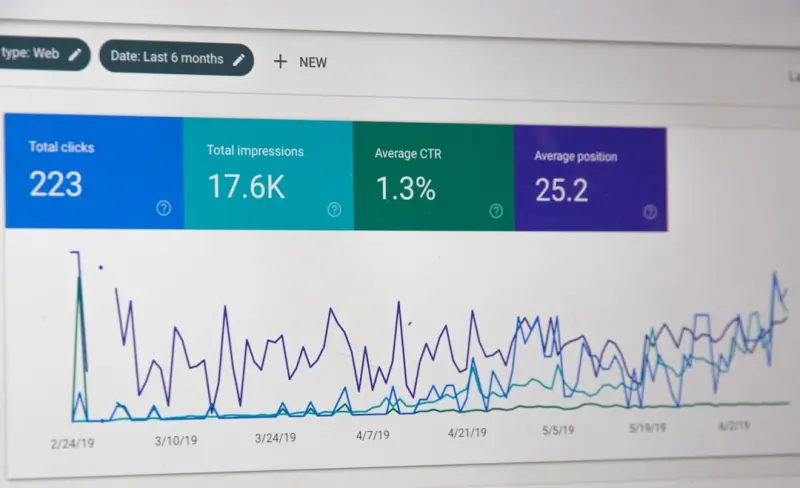
Run a crawl (Screaming Frog, Sitebulb, or a custom script) to surface pages with high organic impressions but low CTR. These are prime candidates for snippet optimization. Look for pages that already rank in the top 10 but aren’t featured—there’s a good chance a snippet is within reach.
Step 2: Map Core SaaS Queries to SERP Features
Identify the primary pain points of your buyer personas: “How to integrate X with Y,” “What is churn rate,” “Best practices for onboarding SaaS users.” Then, allocate each query to a SERP feature. For example:
- “How to calculate churn rate” → Paragraph snippet.
- “SaaS onboarding checklist” → List snippet.
- “API rate limit examples” → Table snippet.
Step 3: Implement Structured Data at Scale
Use JSON‑LD to embed the appropriate schema types: FAQPage, HowTo, Product, and SoftwareApplication. Don’t stop at one page—automate injection across all relevant docs. If you’re using a headless CMS, add a middleware layer that enriches each article with the right markup before serving it.
Step 4: Optimize for Concise, Direct Answers
Google favors content that answers the question before the user scrolls. Place a bolded, 40‑word answer within the first paragraph, then expand with deeper analysis. Use bullet points for list snippets and markdown tables (or HTML <table>) for table snippets.
Step 5: Leverage Internal Linking to Signal Authority
Zero‑click SERP features are heavily influenced by internal link equity. Ensure that high‑authority pages link to your snippet‑optimized content using descriptive anchor text. For instance, a blog post on “API‑first SEO” can naturally link to a detailed guide on “how to structure API documentation for snippets.” Check out our API‑first SEO playbook for a deeper dive on linking strategies that boost visibility.
Step 6: Measure, Iterate, and Scale
Set up a dashboard that tracks three key metrics:
- Snippet Impressions: Google Search Console now reports “Average Position (Featured Snippet)”—watch it climb.
- Zero‑Click CTR: While you won’t see a click, you can gauge brand lift through direct traffic uplift and assisted conversions.
- Organic Conversion Lift: Correlate snippet presence with downstream trial sign‑ups and MQLs.
Iterate on low‑performing snippets by refining the answer length, adding schema, or bolstering internal links.
Zero‑Click and Your SaaS Documentation
Documentation is a goldmine for snippet optimization. Every “How‑to” page, API reference, or troubleshooting guide can become a featured answer. If you haven’t yet turned your docs into a traffic engine, you’re leaving money on the table. Our guide on SaaS documentation traffic engine walks you through turning technical content into SERP real estate—think of it as repurposing your internal knowledge base for public discovery.
Case Study: A Mid‑Size SaaS Company Wins 30% More Leads via Zero‑Click
Company X, a B2B project‑management platform, was stuck at a 2% organic conversion rate despite decent traffic. By applying the framework above, they:
- Identified 12 high‑impression “how‑to” queries lacking snippets.
- Created concise paragraph answers and embedded
FAQPageschema. - Optimized internal links from their blog series on “project‑management best practices.”
Within three months, Google awarded them featured snippets for 8 of those queries. While click‑through remained modest, brand‑assisted conversions spiked 30%, as prospects recognized the product name in the SERP and later entered the site via direct navigation.
Future‑Proofing: Voice Search & Conversational Snippets
Zero‑click isn’t static. With the rise of voice assistants—Google Assistant, Alexa, Siri—the same snippet data powers spoken answers. Structuring your content for text snippets automatically equips you for voice. Think of every paragraph snippet as a script for a voice response. To stay ahead:
- Prioritize natural language queries (“What is churn rate?” vs. “churn rate definition”).
- Keep answers under 50 words—ideal for both screen and audio.
- Use
Speakableschema to signal voice readiness.
Common Pitfalls and How to Avoid Them
Pitfall 1: Over‑Optimizing for Snippets
Don’t sacrifice depth for brevity. Google penalizes “thin content.” Pair the short answer with a richer, well‑structured article that satisfies both the snippet and the deep‑dive reader.
Pitfall 2: Ignoring Mobile‑First Indexing
Most zero‑click interactions happen on mobile. Ensure your markup loads quickly, your answers are legible on small screens, and you’re not serving separate desktop content.
Pitfall 3: Forgetting the Human Element
Snippets are algorithmic, but they still reflect brand voice. Keep the tone consistent with your overall messaging—whether it’s professional, witty, or conversational—so when users later land on your site, the experience feels familiar.
Putting It All Together: A Sample Optimized Article
Below is a skeleton of a page optimized for a paragraph snippet and FAQ schema. Use this as a template for your own content.
<h1>How to Calculate SaaS Churn Rate</h1>
<p><strong>Churn rate = (Lost Customers ÷ Starting Customers) × 100</strong>. This metric shows the percentage of customers who cancel your service over a given period.</p>

<script type="application/ld+json">
{
  "@context": "https://schema.org",
  "@type": "FAQPage",
  "mainEntity": [{
    "@type": "Question",
    "name": "What is churn rate?",
    "acceptedAnswer": {
      "@type": "Answer",
      "text": "Churn rate measures the percentage of customers who cancel your SaaS subscription within a specific time frame."
    }
  },{
    "@type": "Question",
    "name": "How do I calculate monthly churn?",
    "acceptedAnswer": {
      "@type": "Answer",
      "text": "Divide the number of customers lost in a month by the number of customers at the start of that month, then multiply by 100."
    }
  }]
}
</script>
Notice how the answer is bolded and placed at the top—perfect for Google to lift into a featured snippet.
Final Thoughts: Embrace the Invisible Click
Zero‑click search is not a threat; it’s a new avenue for brand exposure. By treating the SERP as a real‑estate portfolio—complete with snippets, FAQs, and reviews—you shift from chasing clicks to owning presence. The payoff is measurable: higher brand recall, assisted conversions, and a more resilient organic strategy that thrives even as click behavior evolves.
If you’re ready to turn the invisible into the invaluable, start with the steps above, plug in your internal expertise, and watch your SaaS name become a staple on the search results page—whether users click or not.

Laura Wilson is a freelance writer specializing in the dynamic and ever-evolving field of health. With a passion for translating complex medical information into accessible and engaging content, Laura brings a wealth of knowledge and a fresh perspective to topics ranging from preventative care and nutrition to cutting-edge research and innovative treatments.
Related Posts
SEO Best Practices: The Big 5 in SEO
In the ever-evolving digital landscape, search engine optimization (SEO) stands as the undisputed ch... Read More

The Golden Rules of Onsite SEO
In the vast, ever-evolving digital landscape, getting your website seen by the right audience can fe... Read More

Semantic SEO for Dynamic Apps: Turning JavaScript into Rankings
A practical guide to semantic SEO for single‑page apps, covering schema markup, server‑side rend... Read More
Top Posts

The Intersection of Web Development and Sustainable Living
As a web developer, learn how to make your website more sustainable and reduce its environmental impact. Discover practical tips and trends in sustainable web d...Read More

Maximizing Your Social Media Presence: Strategies for Sustainable Growth
Maximizing your social media presence requires a combination of understanding your audience, creating engaging content, building a community, and measuring and ...Read More

Navigating the Security Frontier in 2026: AI, Zero Trust, and Sustainable Defenses
A deep dive into 2026’s security challenges—AI‑driven attacks, zero‑trust adoption, smart‑home protection, and sustainable defenses—offering actiona...Read More

Modular Smartphones: A Sustainable Leap for Enterprises
Modular smartphones offer businesses a greener, more secure, and customizable alternative to traditional devices, extending lifespans, reducing e‑waste, and a...Read More
0 Comments
Post Comment
You will need to Login or Register to comment on this post!