
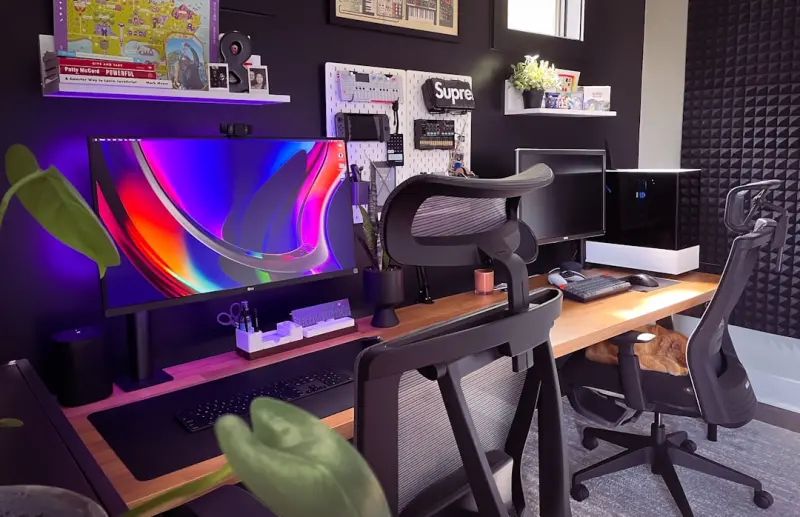
Why Our Senses Are the New Productivity Hack
Remote work has turned our homes into the default office, but most of us set up a workstation the way we would a spare bedroom: a desk, a chair, a laptop, and maybe a plant. What we often forget is that our brains are wired to respond to the full spectrum of sensory input—sound, smell, light, and touch. When those cues are deliberately curated, they become invisible productivity boosters, reducing stress and sharpening focus without a single new app or subscription.
The Soundtrack of Your Home Office
Noise is the #1 complaint in open‑plan offices, and it’s just as distracting at a kitchen table. Yet, the right soundscape can transform a chaotic environment into a sanctuary for concentration.
- White‑noise machines: A gentle hiss masks sudden interruptions from neighbors or traffic. Choose a model that lets you blend rain, wind, or distant surf.
- Curated playlists: Classical, lo‑fi beats, or even binaural beats tuned to the alpha brainwave range (8‑12 Hz) have been shown to improve sustained attention. Create a “focus” station on your favorite streaming service and keep it on loop.
- Nature recordings: The subtle rustle of leaves or a distant waterfall can cue your brain into a restorative state, especially during long writing sessions.
For those who love data‑driven insights, consider using a data‑driven design approach: track which soundscapes align with peak output using a simple time‑tracking app.
Aroma Architecture: How Smell Shapes Mood
Our sense of smell is the most direct link to the limbic system, the brain region responsible for emotion and memory. A whiff of citrus can energize, while lavender calms. Here’s how to build an aroma architecture without cluttering your desk:
- Diffusers with programmable schedules: Set a citrus burst for the morning, a peppermint lift at midday, and a subtle vanilla calm for late afternoon.
- Essential‑oil‑infused desk accessories: Some mouse pads and keyboard covers now come pre‑saturated with calming scents that release slowly as you work.
- DIY scent sachets: Fill a small fabric pouch with dried rosemary and orange peel. Tuck it into a drawer; the scent will rise when you open it.
When you pair scent with intentional breathing exercises—inhale for four counts, hold for four, exhale for six—you amplify the calming effect, creating a micro‑ritual that signals your brain it’s time to focus.
Tactile Textures: From Desk Mats to Chair Fabrics
Touch often gets overlooked, yet the textures we surround ourselves with can either ground us or add to sensory overload.
- Desk mats: A smooth, slightly cushioned mat reduces wrist fatigue and provides a subtle tactile cue that you’re in “work mode.”
- Chair upholstery: Breathable fabrics like mesh keep you cool, while memory‑foam cushions distribute weight evenly, preventing the micro‑tension that builds over long hours.
- Fidget tools: A discreet stress ball or a kinetic desk toy can channel restless energy into a rhythmic motion, keeping the mind engaged without breaking concentration.
Choose one texture as your “anchor” for the day. When you feel your focus drifting, a quick touch of that texture can act as a reset button.
Lighting as Mood‑Setting: Natural vs. Artificial
Lighting is arguably the most influential sensory element in a workspace. It affects melatonin production, eye strain, and even creativity.
- Maximize natural light: Position your desk near a window, but avoid direct glare on the screen. Use sheer curtains to diffuse harsh sunlight while preserving brightness.
- Adjustable LED lamps: Look for models that let you switch between cool (5000 K) and warm (2700 K) tones. Cool light boosts alertness for tasks that require analytical thinking; warm light eases the transition to evening work or reading.
- Smart lighting schedules: Integrate your lamp with a home automation hub so that the light temperature shifts gradually as the day progresses—mirroring the natural sunrise‑sunset cycle.
Research shows that exposure to bright, cool light before noon can increase dopamine levels, sharpening focus for the rest of the day. Conversely, dimmer, warmer light in the evening helps signal to your brain that it’s time to wind down.
Integrating Tech Without Overload
We love gadgets, but the line between helpful and distracting is thin. This is where digital minimalism becomes a lifestyle practice rather than a buzzword. Apply it to your home office by:
- Consolidating notifications: Turn off non‑essential alerts on both phone and computer. Use “Do Not Disturb” windows that align with your peak focus periods.
- Single‑purpose devices: A dedicated e‑ink tablet for reading and note‑taking reduces the temptation to scroll social feeds.
- Automation with intention: Set up simple IFTTT or Zapier recipes that batch repetitive tasks—like saving email attachments to a cloud folder—so you spend less time on admin work.
When technology serves the sensory environment instead of hijacking it, you preserve mental bandwidth for the creative work that truly matters.
Personalizing the Space Without Clutter
Minimalism doesn’t have to mean sterile. The key is intentionality: every object should have a purpose—functional, aesthetic, or emotional.
- Curated artwork: Choose pieces that inspire you, whether it’s an abstract splash of color that sparks brainstorming or a calm landscape that eases anxiety.
- Plants as living decor: A small ZZ plant or a trailing pothos adds a touch of nature, improves air quality, and provides a visual break for the eyes.
- Personal mementos: A photo of a loved one or a souvenir from a memorable trip can serve as a micro‑anchor, reminding you of your broader purpose.
Keep the total number of items on your desk to a maximum of seven—this is the “rule of seven” in visual cognition, which helps prevent the brain from feeling overloaded.
Putting It All Together: A 7‑Day Sensory Reset
To make these concepts stick, try a week‑long experiment. Each day, focus on one sensory element while keeping the others neutral. Here’s a quick plan:
- Day 1 – Sound: Use a white‑noise machine and a curated playlist. Log how many interruptions you notice compared to a baseline.
- Day 2 – Smell: Introduce a new diffuser blend in the morning and note changes in mood or energy levels.
- Day 3 – Touch: Switch to a textured desk mat and a fidget tool. Observe any reduction in physical tension.
- Day 4 – Light: Adjust your lamp to cool light for the first half of the day, then warm light after lunch. Record any shift in focus.
- Day 5 – Tech Minimalism: Turn off all non‑essential notifications and use a single‑purpose e‑ink device for reading.
- Day 6 – Personalization: Add a piece of artwork or a plant. Notice whether the space feels more inviting.
- Day 7 – Integration: Combine all the tweaks you liked most. Evaluate overall productivity and well‑being.
At the end of the week, you’ll have a data‑backed sense of which sensory inputs boost your performance the most. The beauty of this approach is its scalability: you can keep all seven elements, or you can fine‑tune the mix to match the rhythm of your work life.
Future‑Proofing Your Sensory Office
As remote work evolves, so will the tools we use to shape our environments. Emerging technologies like AI co‑creation can generate personalized soundscapes based on real‑time biometric feedback. Imagine a headset that reads your heart rate and adjusts ambient noise to keep you in the optimal zone.
While those innovations are on the horizon, the fundamentals—sound, scent, touch, light, and mindful tech use—remain timeless. By treating your home office as a sensory ecosystem, you not only boost productivity but also safeguard mental health, turning everyday work into a more humane, enjoyable experience.

Shawn DesRochers is a certified Microsoft technician and Programmer with 30+ year's experience. He has written many reviews on computer related products, software, and SEO related topics. When he's not writing reviews he can be found at one of the Oldest Directories Online Blogging Fusion Business Directory which he is the CEO of.
Related Posts

Rediscovering the Art of Daylight: How Sunlight Shapes Our Everyday Rhythm
A deep dive into the subtle power of daylight and practical tips to harness its benefits for better ... Read More
Curating Personal Soundscapes: How Ambient Audio Transforms Everyday Life
Explore the power of curated ambient audio to reshape daily habits, boost mental well‑being, and c... Read More
How to Turn Your Home into a Sensory Sanctuary
Learn practical steps to craft a sensory sanctuary at home, using aromas, soundscapes, lighting, and... Read More
Top Posts

Signs That Your Roof Needs Repair
Your roof is the first line of defense against the elements, protecting your home and family from rain, snow, wind, and sun. It's easy to take it for granted wh...Read More
Turning Email Into a Personal Dialogue: Strategies That Resonate
Learn to turn email into a one‑to‑one conversation using behavioral triggers, dynamic content, and AI‑driven segmentation for deeper engagement and trust....Read More
From Data to Story: Building an Agile Creative Engine for Media Agencies
Media agencies can stay ahead by building an agile creative engine that combines modular assets, real‑time audience signals, and integrated delivery, turning ...Read More
Why Managed WordPress Hosting Is the Secret Weapon for Modern Sites
Managed WordPress hosting delivers lightning‑fast performance, rock‑solid security, and effortless scaling—freeing you to create, convert, and grow withou...Read More
0 Comments
Post Comment
You will need to Login or Register to comment on this post!