
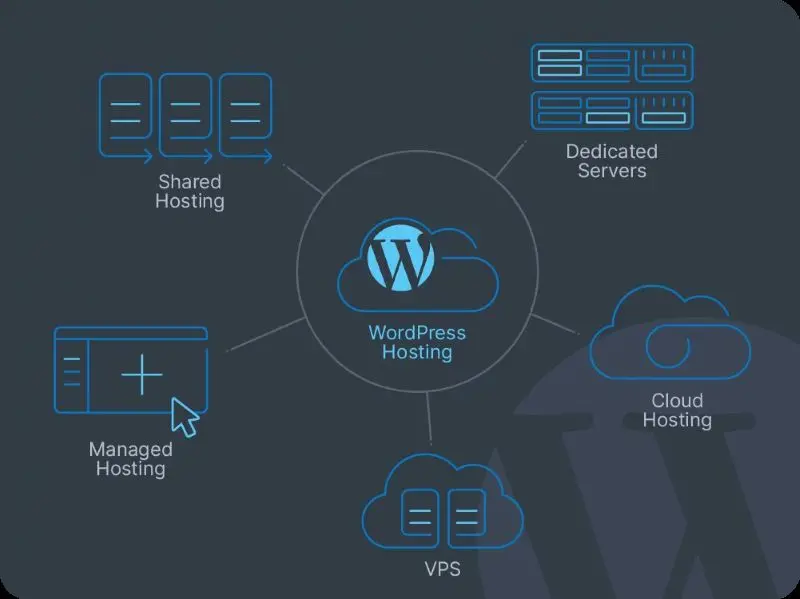
Why Managed WordPress Hosting Is the Quiet Engine Behind Your Brand
When you finally decide to treat your WordPress site as a business asset rather than a hobby project, the first thing you notice is that the days of juggling plugins, patches, and server quirks start to fade into the background, replaced by a sense of steady, almost invisible momentum that lets you focus on creating instead of firefighting. Managed WordPress hosting steps in as a specialized service layer that handles updates, backups, and server optimization automatically, meaning you no longer have to schedule nightly cron jobs or stare at error logs while the clock ticks on your next product launch. The result is a calmer, more predictable online presence that lets your audience engage without the occasional “site down” interruptions that can erode trust in a split second.
The Real Cost of DIY Hosting: Hidden Expenses That Bite
Most entrepreneurs assume that paying for a shared server is cheaper than a managed solution, but that calculation often ignores the hidden labor hours spent troubleshooting, the opportunity cost of delayed content releases, and the inevitable security breaches that require emergency fixes and potential reputation repair. Each hour you spend manually applying core updates, monitoring uptime, or sifting through log files could instead be invested in crafting compelling copy, designing new products, or nurturing your community, all of which drive revenue more directly than server maintenance ever could. When you factor in these intangible costs, the modest monthly fee for managed WordPress hosting starts to look like a strategic investment rather than an expense.
Performance Gains That Translate Straight Into SEO Wins
Search engines reward sites that load quickly, respond instantly, and stay consistently available, and managed WordPress providers often sit on finely tuned server stacks that deliver sub‑second TTFB, intelligent caching layers, and CDN integration out of the box, giving you a performance head start without any extra configuration. Because these platforms continuously monitor resource usage and automatically scale resources during traffic spikes, your pages remain fast even when a viral post or a sudden influx of newsletter clicks drives thousands of visitors to your site in a matter of minutes. In practice, that speed translates into lower bounce rates, higher dwell time, and a measurable boost in rankings—benefits that are hard to achieve when you’re stuck on a generic shared host that throttles bandwidth at the first sign of load.
Security You Can Trust, So You Can Sleep
Every WordPress site is a potential target for bots, bots, and malicious actors, but a managed host builds security into every layer, from hardened servers and malware scanning to automatic core and plugin updates that seal known vulnerabilities before they can be exploited. Many providers also offer web application firewalls (WAFs) and real‑time threat detection, which act like a digital guard dog that barks at suspicious traffic before it reaches your codebase, dramatically reducing the odds of a breach that could compromise user data or tarnish your brand’s reputation. Knowing that a team of specialists monitors your environment 24/7 lets you focus on building relationships with your audience instead of constantly checking security dashboards for red alerts.
Scalable Architecture for the Unpredictable Creator Economy
In the creator economy, a single Instagram story or podcast episode can generate a sudden surge of traffic that would overwhelm a traditional shared host, causing slowdowns or complete outages that frustrate fans and lose conversions. Managed WordPress hosting platforms are built with elastic scaling in mind, automatically allocating more CPU, RAM, and bandwidth the moment traffic spikes are detected, then gracefully scaling back when the rush subsides, all without any manual intervention on your part. This elasticity ensures that whether you’re hosting a launch webinar for 10,000 participants or a modest blog post for a handful of readers, the experience remains smooth, professional, and ready for any level of demand.
Boosting Developer Productivity With Built‑In Tooling
When your hosting environment includes staging sites, one‑click cloning, and Git integration, developers no longer need to spin up local servers or manually migrate databases, cutting down release cycles from days to hours and allowing rapid iteration on features that keep your audience engaged. Managed platforms also provide built‑in performance profiling tools that highlight slow queries, heavy scripts, and bottlenecks before they reach production, turning what used to be a post‑mortem nightmare into a proactive optimization routine. By removing these technical frictions, you free up your team to focus on creative problem solving and user‑centric enhancements rather than wrestling with infrastructure.
Creating Seamless Experiences With Micro‑Interactions
Today’s audiences expect subtle, responsive feedback when they hover over a button, submit a form, or scroll through a page, and a well‑tuned managed WordPress environment gives you the bandwidth to implement those human‑first micro‑interactions without compromising load times or stability. Because the server stack is optimized for rapid asset delivery, you can safely add lightweight JavaScript animations, lazy‑loaded images, and interactive widgets that elevate the user journey, creating moments that feel personal and polished. These micro‑moments, though small, compound into a perception of professionalism that can differentiate your brand in a crowded marketplace.
Calculating the ROI: From Email Engagement to Revenue Growth
When you pair a high‑performance, secure site with smart email workflows, the conversion funnel becomes dramatically more efficient, as visitors arriving from personalized campaigns encounter a site that loads instantly and guides them smoothly to the checkout or signup page. The synergy between a reliable hosting foundation and thoughtful email strategy is highlighted in the guide on turning email into a personal dialogue, where faster page loads directly correlate with higher click‑through rates and lower cart abandonment. By tracking metrics such as average order value, lifetime customer value, and reduced support tickets, you’ll often see the modest monthly hosting fee pay for itself within a few months, delivering a clear and quantifiable return on investment.
Actionable Checklist: Transitioning to Managed WordPress Hosting
Start by auditing your current plugins and themes, disabling any that are redundant or no longer supported, then choose a managed provider that offers staging, automated backups, and a robust CDN; migrate your database using the provider’s one‑click import tool, test the site on the staging environment, and run a performance audit with tools like GTmetrix to confirm speed gains before going live. Next, configure security settings, enable two‑factor authentication for all admin accounts, and set up regular vulnerability scans to maintain a hardened perimeter. Finally, schedule a quarterly review of resource usage, traffic patterns, and conversion metrics to ensure your hosting plan continues to align with business growth, and adjust resources or upgrade tiers proactively rather than reacting to crises.

In the world of freelance writing, where creativity and adaptability are paramount, Michelle Fisher stands out as a dedicated and versatile professional. With a passion for crafting compelling narratives and a keen eye for detail, Michelle has established herself as a trusted voice.
Related Posts

Managed WordPress Hosting: The SaaS Growth Engine You’ve Been Overlooking
A managed WordPress host isn’t a luxury—it’s a strategic growth tool. Learn why SaaS teams sho... Read More

Why Managed WordPress Hosting Is the Secret Weapon for Serious Publishers
Managed WordPress hosting does more than keep your site online. It unlocks speed, security, and reve... Read More
Beyond the Basics: Why Managed WordPress Hosting Is Your Growth Engine
Managed WordPress hosting delivers performance, security, and scalability that translate directly in... Read More
Top Posts

Why Citizens Are Turning to Micro‑Referendums to Reclaim Power
Micro‑referendums let neighborhoods decide on specific issues quickly and securely, using privacy‑first tech to rebuild trust and reshape the political land...Read More

The Power of Sustainable Storytelling in Content Marketing
Sustainable storytelling is a powerful approach to content marketing that can help brands connect with their audiences on a deeper level and inspire them to tak...Read More

Small Wins, Huge Impact: Building Everyday Momentum
A practical guide to harnessing micro‑habits for lasting lifestyle change, showing how small, consistent actions boost energy, focus, and happiness without ov...Read More

Google Gemini: The Future of AI-Powered Search
Google Gemini is an AI-powered chatbot that's revolutionizing the way we interact with search engines. Learn how businesses can adapt and thrive in a rapidly ch...Read More
0 Comments
Post Comment
You will need to Login or Register to comment on this post!