
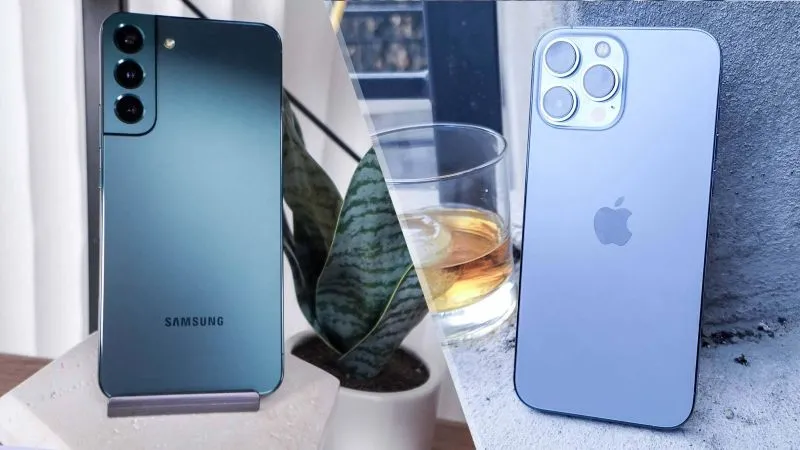
In an era where a smartphone is as essential as a wallet, choosing the right device can feel overwhelming. The market is split between two dominant ecosystems-Apple’s iOS and Google’s Android-each offering a distinct blend of hardware, software, and services. Below is a comprehensive, professional‑style guide that walks you through the critical factors to consider, helping you turn a daunting purchase into a confident, data‑driven decision.
1. Clarify Your Core Priorities
Before you stare at spec sheets, write down the three to five attributes that matter most to you. Typical priorities include:
| Priority | Why it matters | How it maps to iOS vs. Android |
|---|---|---|
| Camera quality | Influences content creation, low‑light performance, video work | Both ecosystems now offer flagship‑grade lenses, but Apple’s consistency in color science and Google’s computational photography lead in different scenarios. |
| Software updates | Affects security, new features, and resale value | iPhones receive 5–6 years of major iOS updates; Android updates vary widely by manufacturer (Pixel → 5 years, others → 2–3 years). |
| Ecosystem integration | Determines how smoothly the phone works with other devices (laptops, wearables, smart home) | Apple’s seamless continuity (Handoff, AirDrop, iCloud); Android’s flexibility with Google services and wider third‑party hardware options. |
| Customization | Ability to tweak UI, default apps, and automation | Android excels with launchers, widgets, and custom ROMs; iOS now offers widgets but remains more locked‑down. |
| Budget & value retention | Initial outlay vs. long‑term cost of ownership | iPhones hold resale value well; Android offers a broader price spectrum and often cheaper entry‑level flagships. |
Writing these down creates a decision matrix you can refer back to throughout the buying process.
2. Evaluate the Hardware Landscape
2.1. Processor & Performance
- Apple’s A‑series chips (A16, A17 Bionic) are built on a leading‑edge 4‑nm process and integrate CPU, GPU, and Neural Engine. Benchmarks consistently show them outperforming most Android SoCs in single‑core tasks and AI workloads.
- Android flagships (Snapdragon 8 Gen 3, Google Tensor G3, Exynos 2300) close the gap, especially in multi‑core performance and power efficiency. If you run heavy gaming or intensive video editing, look for devices with a high‑performance GPU tier (Adreno 730, Mali‑G710) and a robust cooling system.
2.2. Display
- iPhone: Super Retina XDR OLED panels with True Tone, HDR10, and up to 120 Hz ProMotion (iPhone 15 Pro). Brightness peaks around 1,800–2,000 nits in outdoor mode.
- Android: AMOLED panels dominate, with many manufacturers offering 120 Hz or even 144 Hz refresh rates (e.g., Samsung Galaxy S23 Ultra, OnePlus 12). Look for HDR10+ support if you consume a lot of streaming video.
2.3. Battery & Charging
- iPhone: Typically 3,000–4,500 mAh, optimized by iOS to deliver 10‑12 hours of mixed use. Supports 20‑W wired fast charging and 15‑W MagSafe wireless charging.
- Android: Battery capacities range from 3,500 mAh to 5,000 mAh. Many flagships ship with 25‑W or 45‑W wired fast charging, and some (e.g., Xiaomi 13 Pro) push 80‑W. Wireless standards vary (Qi, PMA). Consider real‑world endurance tests rather than advertised mAh numbers.
2.4. Build Quality & Durability
- Materials: iPhones use aerospace‑grade aluminum or surgical‑grade stainless steel with Ceramic Shield front glass. High‑end Android devices may use Gorilla Glass Victus 2, titanium frames (e.g., Sony Xperia 1 V), or even ceramic.
- IP Rating: Both ecosystems now universally offer IP68 water‑dust resistance, but note the exact depth and time specifications—Apple guarantees 6 m for 30 min, whereas some Android brands list 1.5 m for 30 min.
3. Software Experience – The Heart of the Device
3.1. Operating System Philosophy
- iOS: Closed ecosystem, uniform UI, curated App Store, strong privacy sandbox. Regular, simultaneous updates across all supported iPhones.
- Android: Open‑source core, manufacturer skins (One UI, OxygenOS, MIUI) add features but can introduce bloat. Google Play Store is less restrictive, allowing alternative app stores and sideloading.
3.2. Integration With Other Devices
| Feature | iOS (Apple) | Android (Google) |
|---|---|---|
| Continuity (Calls, texts, clipboard) | Seamless across iPhone, iPad, Mac, Apple Watch | Limited; Chrome sync, calls via “Your Phone” (Windows), but less native hand‑off. |
| Smart Home | HomeKit (limited device base) | Google Home + Assistant (broader compatibility) |
| Wearables | Apple Watch (only with iPhone) | Wide range: Wear OS, Samsung Galaxy Watch, Fitbit, etc. |
| File Management | Files app, AirDrop (peer‑to‑peer) | Files by Google, Nearby Share, but not as integrated. |
If you already own a MacBook, iPad, or Apple Watch, the iPhone’s ecosystem lock‑in generally outweighs marginal hardware advantages. Conversely, if you use a Windows PC, a Chromebook, or a variety of third‑party accessories, Android’s flexibility can be a decisive factor.
3.3. Privacy & Security
- Apple: Emphasizes on‑device processing for Siri, privacy “nutrition labels” for apps, and mandatory encryption of iMessage/FaceTime.
- Google: Provides granular permissions, “Safety Check” in Android 13+, and regular security patches. However, the company’s ad‑targeting business model means more data collection by default.
If privacy is a non‑negotiable criterion, prioritize devices that enable “App Tracking Transparency” (iOS) or install privacy‑focused ROMs/custom launchers on Android (e.g., GrapheneOS on Pixel).
4. Future‑Proofing – How Long Will It Serve You?
Update Horizon
- iPhone: 5–6 years of iOS updates. The iPhone 15 Pro, for example, will likely receive support until 2030.
- Pixel & Samsung: Pixel devices receive 5 years of OS updates + 3 years of security patches. Samsung’s “One UI 6” promises 4‑year OS support for flagship models.
5G & Connectivity
- Both ecosystems now ship with sub‑6 GHz and mmWave 5G (where available). Verify carrier compatibility, especially if you travel internationally—many Android flagships support a broader band range.
Repairability & Service
- iPhone: Apple’s Genius Bar offers in‑store repairs, but components are tightly sealed; battery replacement costs around $199 (US).
- Android: Google’s “Pixel Repair” centers and many OEM‑run service networks. Some models (e.g., Fairphone) are designed for modular repairs, appealing to sustainability‑minded buyers.
Resale Value
- Historically, iPhones retain ~60–70 % of their original price after 12 months, while Android devices typically drop to 40–50 % (except premium Samsung devices, which hold slightly better). If you plan to upgrade annually, consider the resale market when budgeting.
5. Cost Analysis – Beyond the Sticker Price
| Cost Element | iPhone Example (iPhone 15 Pro) | Android Example (Pixel 8 Pro) |
|---|---|---|
| Base price | $999 (128 GB) | $899 (128 GB) |
| Typical 12‑month resale | $650‑$700 | $450‑$550 |
| AppleCare+ (2 yr) | $199 | N/A (Google offers 2‑yr “Preferred Care” at $149) |
| Battery replacement | $199 | $100‑$150 (varies by OEM) |
| Accessories (charger, case, earbuds) | $49 + $199 + $159 | $0 + $129 + $199 (often bundled) |
When you amortize the total cost of ownership (TCO) over two years, iPhone’s higher upfront price can be offset by stronger resale value and longer software support. Android offers a lower entry point and more flexible accessories, but you may need to budget for earlier battery swaps or OS upgrades.
6. Practical Buying Strategies
Timing Your Purchase
- Apple: New iPhone announcements occur in early September. Prices tend to drop on older models by late October–November.
- Android: Flagship releases are staggered (Samsung’s S‑series in February, Google Pixel in October). Consider buying a “last‑generation” flag‑ship 2–3 months after launch for a 15‑30 % discount.
Carrier vs. Unlocked
- Unlocked devices give you freedom to switch carriers and typically enjoy better resale value. However, carrier‑subsidized phones can reduce upfront cost if you’re comfortable with a contract.
Trade‑In Programs
- Both Apple and Google offer trade‑in credits for older devices. Evaluate the fair market value of your current phone on third‑party sites (e.g., Swappa) vs. the trade‑in offer to ensure you’re not losing equity.
Testing In‑Store
- Spend at least 15 minutes handling the device. Look for ergonomic comfort, screen brightness under natural light, and responsiveness of the fingerprint sensor or facial recognition.
Read Independent Reviews
- Rely on sources that test real‑world scenarios (battery endurance, camera performance in varied lighting, durability). Remember that manufacturer demos can be cherry‑picked; third‑party labs provide more objective data.
7. Decision‑Making Checklist
| Checklist Item | Yes/No | Comments |
|---|---|---|
| Have I identified my top 3‑5 priorities? | ||
| Does the device meet my camera expectations (low‑light, video, software features)? | ||
| Does the processor and RAM comfortably exceed my typical workload? | ||
| Is the display size, refresh rate, and brightness suitable for my daily use? | ||
| Will the software ecosystem integrate with my existing devices (laptop, tablet, wearables)? | ||
| Does the manufacturer guarantee software updates for a period that matches my usage horizon? | ||
| Is the price (including accessories, insurance, and potential repairs) within my budget? | ||
| Have I considered future resale value and environmental impact (repairability, recycling)? | ||
| Have I tested the device in‑person or watched unbiased video reviews? | ||
| Do I have a clear upgrade path (trade‑in, financing, carrier plan)? |
If the majority of answers are “Yes,” you have a data‑driven justification for proceeding. If several critical items are “No,” revisit your shortlist or adjust priorities.
8. Concluding Thoughts
Choosing between a new iPhone and an Android smartphone is less about “which brand is better” and more about aligning a device’s technical capabilities with your personal workflow, ecosystem preferences, and long‑term value expectations. By systematically assessing hardware specifications, software experience, update longevity, privacy posture, and total cost of ownership, you transform a potentially gut‑driven purchase into a strategic investment.
Remember that the market evolves rapidly: today’s flagship may become tomorrow’s mid‑range model, and software ecosystems continuously close feature gaps. The most successful decision is one that remains flexible—opting for a device that can adapt to new apps, services, and use‑cases without forcing you into a premature upgrade cycle.
Armed with the criteria and checklist above, you can step into any store or online catalog with confidence, knowing exactly which questions to ask and which trade‑offs you’re willing to accept. Happy shopping, and may your next smartphone serve you reliably for years to come.

Jim Pearse, a seasoned freelance writer, brings a wealth of knowledge and passion to the world of home and garden. From the intricacies of landscaping to the nuances of interior design, Jim delves into every aspect of creating comfortable, beautiful, and functional living spaces.
Related Posts
How to Locate a Lost iPhone, iPad, Apple Watch, and MacBook: A Comprehensive Guide to Finding Your Apple Devices
Losing an Apple device – whether it’s your indispensable iPhone, your versatile iPad, your trust... Read More
Samsung Messages Is Being Retired. Here's How to Move Everything Before July
Samsung is phasing out its native messaging app, making it vital for users to migrate their data. Th... Read More
A Professional Guide to Comprehensive New Phone Protection
The acquisition of a new premium-tier smartphone represents a significant financial and technologica... Read More
Top Posts

Turbocharge Your On-Page SEO with a Sprint Mindset
Learn how a sprint mindset transforms on‑page SEO, from rapid title tweaks to lightning‑fast page structures, delivering higher rankings and better user eng...Read More

Beyond the Label: Decoding Ingredient Transparency in Modern Beauty
Ingredient transparency has shifted from a niche buzzword to a decisive purchase factor, reshaping product development, marketing, and supply chains. This post ...Read More

Best Places to Eat in Toronto, Canada - A Foodies Paradise
Discover the vibrant flavors of Toronto, a true foodie paradise in Ontario. From historic markets to Michelin-starred restaurants, explore the diverse culinary ...Read More

The New Era of SEO: Why Adaptability is Your Greatest Asset
SEO is no longer about tricking algorithms; it is about building sustainable authority. Learn why a strategy-first approach is the only way to thrive in the mod...Read More
0 Comments
Post Comment
You will need to Login or Register to comment on this post!